
MainWP URL Extractor Extension
Pull post and page URLs from the child sites you choose into one CSV or TXT file, ready for a client report or your indexing tool.

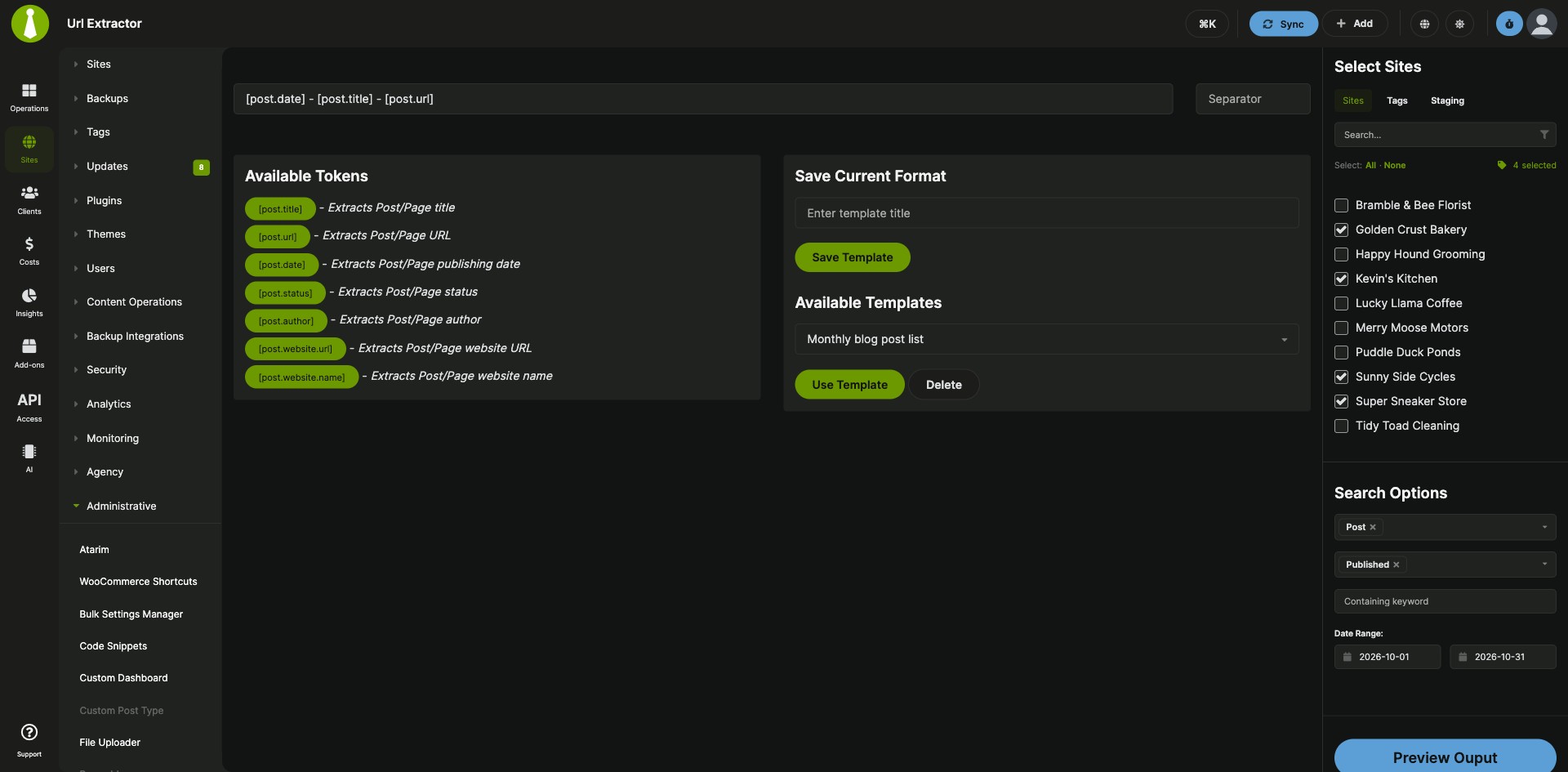

Extract post and page URLs from your child sites into one file
The MainWP URL Extractor Extension is a Pro MainWP add-on that pulls post and page URLs from the child sites you pick and exports them as one CSV or TXT file. Instead of collecting URLs site by site, you filter by site or tag, type, status, keyword and date range, build each line from tokens such as [post.title], [post.url] and [post.website.name], and save the format as a template for next time. For a monthly client report, select the client’s sites, filter to posts published last month, and export each post’s date, title and URL in one file. Save that format as a template, and next month’s list starts from Use Template. The same export feeds your indexing software.
Features
The MainWP URL Extractor Extension builds the list on your MainWP Dashboard from the posts and pages on your connected child sites.
| Feature | What it means for you |
|---|---|
| Output tokens | Build each entry from [post.title], [post.url], [post.date], [post.status], [post.author], [post.website.url] and [post.website.name]. Type them or click the green token bubbles, and mix them with plain text. |
| Custom separator | Choose the text that separates entries, or leave the Separator empty to put each entry on its own line. |
| Search filters | Pick child sites one by one or by tag, then narrow the results by type (posts, pages or both), status (Published, Pending, Private, Scheduled, Draft, Trash), keyword and date range. |
| Preview and export | Check the output in a popup before you export it as a .txt or .csv file. |
| Templates | Save an Output format and Separator as a named template, load it later with Use Template, or delete it. |
| Adjustable post limit | Pull up to 50 posts from each child site out of the box, or raise the number (for example to 500) with one filter on your Dashboard. |
Requirements
The MainWP URL Extractor Extension runs on your MainWP Dashboard and works without third-party plugins or APIs.
| Item | Requirement |
|---|---|
| License | MainWP Pro |
| MainWP Dashboard | The MainWP URL Extractor Extension installed and activated on your Dashboard site |
| Child sites | Nothing to install. The extension reads posts and pages from the child sites already connected to your Dashboard. |
| Third-party plugins or APIs | None |
Setup: run an export
An export with the MainWP URL Extractor Extension takes five steps, and saving its format as a template takes three more.
Extract and export URLs
- Go to MainWP Dashboard > Add-ons > Administrative > URL Extractor.
- In the Output format field, type the tokens or click the green token bubbles. You can add plain text, for example
This is the Post URL [post.url]. - Enter a Separator, or leave it empty to put each entry on a new line.
- In the sidebar, select the sites (one by one or by tag), the post type, one or more statuses, an optional keyword and the date range.
- Click the preview button, review the results in the popup, and export them as a .txt or .csv file.
Save and reuse a template
- Enter the Output format and Separator you want to keep.
- Enter a template name and click Save Template.
- To use it later, select it from Available Templates and click Use Template. To remove it, select it and click Delete.
Full instructions, including how to raise the post limit: MainWP URL Extractor Extension documentation.
URL Extractor FAQ
Do I need to install anything on my child sites?
No. The MainWP URL Extractor Extension runs on your MainWP Dashboard and reads posts and pages from the child sites already connected to it.
How many posts does it return from each child site?
Up to 50 posts per child site by default. A short snippet on your Dashboard raises that number, for example to 500, and the documentation shows the easiest way to add it.
Can I save my output format for later?
Yes, the MainWP URL Extractor Extension saves the Output format and Separator as a template with Save Template, and you load it any time from Available Templates with Use Template.