
MainWP Post Plus Extension
Publish one article to many child sites with a different author, category and date on each site.


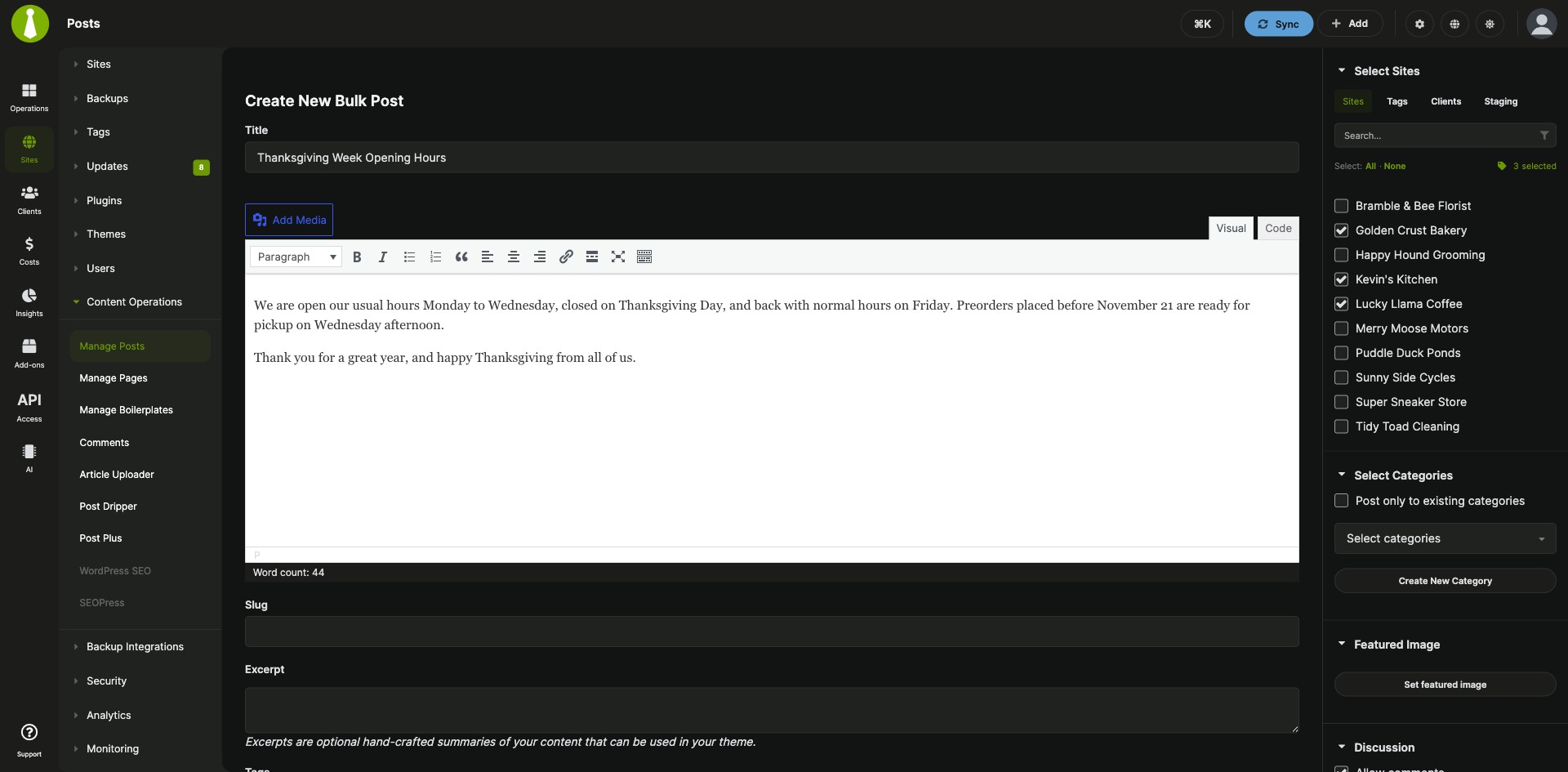
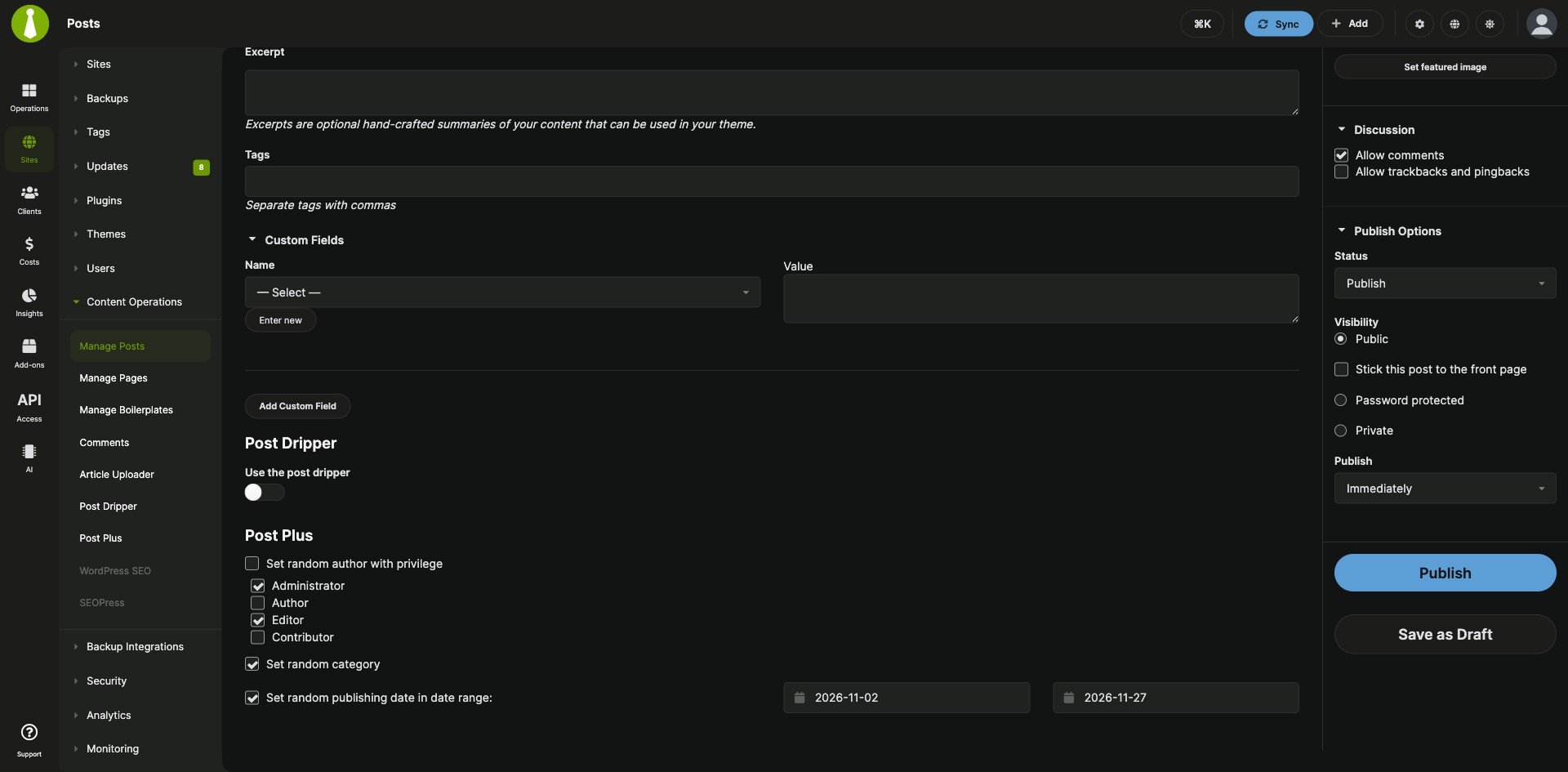
Save Dashboard drafts and vary each site’s author, category and date
The MainWP Post Plus Extension is a Pro MainWP add-on that lets you save drafts on your MainWP Dashboard and publish one article to many child sites with a different author, category and date on each. Drafts wait on your Dashboard until you publish them, and as the post goes out, the Post Plus section on the Add New screen picks the author, category and date for each site, so your network reads like it has several active bloggers.
Features
The MainWP Post Plus Extension adds draft saving and a Post Plus section to the Add New post and page screens under Sites > Content Operations.
| Feature | What it means for you |
|---|---|
| Dashboard drafts | Click Save as Draft while you write a post or page under Sites > Content Operations > Add New, and your progress is saved on your MainWP Dashboard. |
| Drafts pages | Find saved drafts under Sites > Content Operations > Manage Posts > Drafts and Manage Pages > Drafts, where you can publish, edit or delete them. Choose which columns show, reorder them, and scroll the list horizontally. |
| Publish from the list or the editor | Publish a draft with the Publish action on the Drafts page, or open it with Edit, change what you need, and click Publish. |
| Random author | Choose one or more user roles, and Post Plus assigns a random existing user from those roles on each child site, so the article has a different author on each site. |
| Random category | For posts, Post Plus picks one of the existing categories on each child site. |
| Random publishing date | Set a date range and Post Plus picks a random date in it for each site. Leave the range blank and it picks a date between now and seven days from now. |
Requirements
The MainWP Post Plus Extension installs on your MainWP Dashboard and draws its random authors and categories from what each child site already has.
| Item | Requirement |
|---|---|
| License | MainWP Pro |
| MainWP Dashboard | The MainWP Post Plus Extension installed on your Dashboard site |
| Child sites | Nothing extra to install. Post Plus publishes through the MainWP Child plugin your sites already run. |
| Random authors | Existing users in the roles you select on each child site |
| Random categories | Existing categories on each child site |
| Third-party plugins or services | None |
Setup: drafts and random post details
The MainWP Post Plus Extension works inside the post and page screens you already use, so each task below is a few clicks while you write.
Save a post or page as a draft
- Go to Sites > Content Operations > Add New for posts, or the Add New page for pages.
- Start creating the post or page.
- Click Save as Draft whenever you want to save your progress.
Publish a saved draft
- Go to Sites > Content Operations > Manage Posts > Drafts, or Manage Pages > Drafts for pages.
- Find the draft and click the Publish action.
- To change it first, click the Edit action instead, edit the fields, and click the Publish button in the Publish section.
Randomize the author, category and publishing date
- On the Add New page for posts or pages, find the Post Plus section.
- For a random author, select Set random author with privilege and choose the roles.
- For a random category on a post, select Set random category.
- For a random date, check Set random publishing date in date range and, if you want, set a date range.
Full instructions for drafts and random metadata: Post Plus documentation.
Post Plus FAQ
How does Post Plus choose a random author?
The MainWP Post Plus Extension picks a random existing user from the roles you select, on each child site. Select Set random author with privilege in the Post Plus section and choose the roles, and the article gets a different author on each of your child sites.
What publishing date does Post Plus use if I leave the date range blank?
The MainWP Post Plus Extension picks a random date between now and seven days from now when the range is blank. If you set a date range, it picks a random date inside that range for each child site.
Which content types support random categories in Post Plus?
Random categories in the MainWP Post Plus Extension work on posts. Random authors and random publishing dates work for both posts and pages.