
Pressable Integration
Handle Pressable CDN, staging and backup tasks for your child sites without logging in to Pressable.

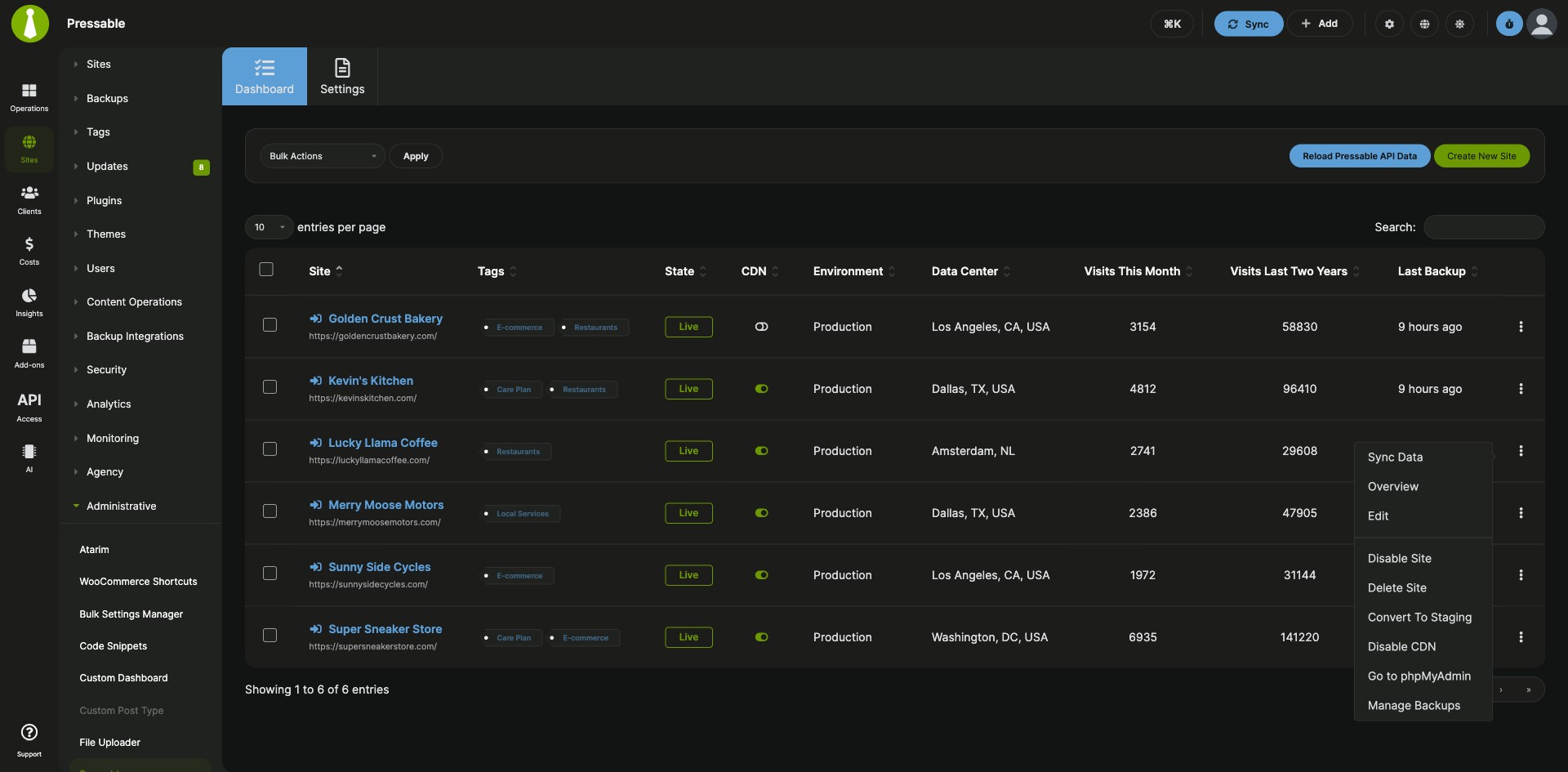


Pressable hosting controls next to your child sites
The Pressable Integration is a Pro MainWP add-on that lets you run Pressable hosting tasks for your Pressable-hosted child sites from your MainWP Dashboard, without logging in to Pressable. From one table you create Pressable sites, turn sites and the Pressable CDN on or off, switch between staging and live, and restore or download backups.
One place for hosting and site maintenance
Agencies that host client sites on Pressable run hosting tasks in the Pressable dashboard and site maintenance in MainWP, switching between the two to create a site, check its environment or data center, turn on the CDN, or find a backup. The Pressable Integration puts those hosting actions next to your child sites in MainWP, one site at a time or in bulk.
Features
The Pressable Integration covers the hosting tasks you’d otherwise open the Pressable dashboard for.
| Feature | What it means for you |
|---|---|
| Pressable site overview | One table lists every Pressable site that is also a child site in your Dashboard, with its CDN status, State, Environment, Data Center, IP Address, Visits This Month, Visits Last Two Years and Last Backup. |
| Create Pressable sites | Click Create New Site, enter a site name, choose whether it is a staging site, WordPress or WooCommerce, the PHP version and, optionally, the data center. |
| Site state, environment and CDN | Set a site to Live or Disabled, convert it from live to staging or from staging to live, enable or disable the Pressable CDN, or delete the site from your Pressable account. |
| Backups | Open a site’s Pressable Backups page to start a site restore or download an existing backup file. |
| phpMyAdmin access | Open the site’s phpMyAdmin page on Pressable from its actions menu. |
| Bulk hosting actions | Enable, disable or delete sites, convert between live and staging, enable or disable the CDN, or open phpMyAdmin for several sites at once from the Bulk Actions menu. |
| Automatic site matching | Version 5.1 links Pressable sites to child sites by the Pressable primary URL and any custom domains, so a child site on a custom domain is matched with no manual mapping. |
Requirements
The Pressable Integration connects your MainWP Dashboard to your Pressable account through the Pressable API.
| Item | Requirement |
|---|---|
| License | MainWP Pro |
| Pressable account | An active Pressable hosting account |
| Pressable API credentials | A Client ID and Client Secret from a Pressable API Application with all permissions |
| Child sites | Your Pressable-hosted sites added to your MainWP Dashboard as child sites, with nothing extra to install on them |
Setup: install, create API credentials, connect
Setting up the Pressable Integration takes three short steps, one of them in your Pressable account.
Install the integration
- In your MainWP Dashboard, go to Add-ons > Manage Add-ons and click Install Add-ons.
- Select the Pressable Integration and click Install.
- When the installation finishes, click Activate Add-ons.
Create your Pressable API credentials
- In your Pressable account, open the API Application page and click Create New API Application.
- Enter a name, give the application all permissions, and click Save.
- Copy the Client ID and Client Secret, or keep the tab open.
Connect your Pressable account
- In MainWP, go to Add-ons > Administrative > Pressable and open the Settings tab.
- Enter the Client ID and Client Secret and click Save Settings.
Full instructions for the dashboard table, site creation and site actions: Pressable Integration documentation.
How the integration talks to your hosting account
The Pressable Integration runs on your MainWP Dashboard and talks to the Pressable API with your Client ID and Client Secret. It lists the Pressable sites that are also child sites in your Dashboard, matched by primary URL and custom domains. Hosting actions such as Enable, Disable, Delete and CDN changes apply to the site in your Pressable account.
Pressable FAQ
Which Pressable sites show up in MainWP?
The Pressable Integration shows each Pressable site that is also added to your MainWP Dashboard as a child site. It matches the child site’s URL against the Pressable primary URL and custom domains, so after you add or change a custom domain in Pressable, reload the Pressable API data from the Dashboard tab.
Can I restore a Pressable backup from MainWP?
You can start a Pressable site restore from MainWP. Choose Manage Backups from the site’s actions menu to open its Pressable Backups page, then start a site restore or download one of the existing backup files.
How do I disconnect my Pressable account?
To disconnect the Pressable Integration, open the Settings tab, clear the Client ID and Client Secret fields, and click Save Settings. Saving empty values removes the stored credentials and the cached access token.
What do I need to pay for?
The Pressable Integration needs a MainWP Pro license and an active Pressable hosting account, where you create the API Application that gives you the Client ID and Client Secret.
Where do I get support?
Pressable handles issues with your Pressable hosting account. See pressable.com. MainWP support handles issues with the integration.