
MainWP Yoast SEO Extension
Apply one Yoast SEO settings template to many child sites and publish posts with their Yoast SEO values.


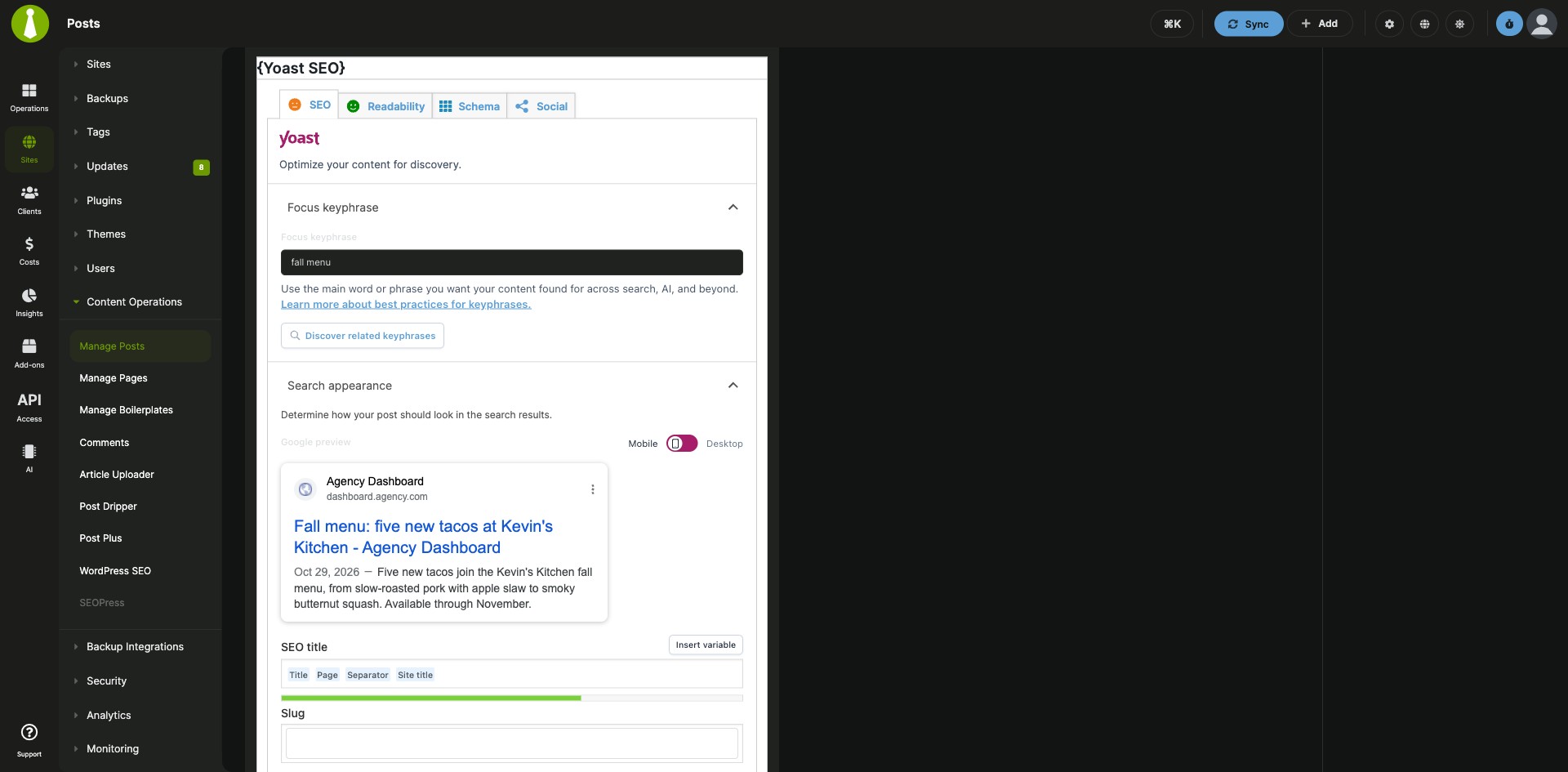

Apply Yoast SEO settings templates and publish posts with SEO values to your child sites from your MainWP Dashboard
The Yoast SEO Extension is a Pro MainWP add-on that lets you configure Yoast SEO once and apply the same settings to many child sites from your MainWP Dashboard. It also shows which sites have a Yoast SEO update or a deactivated copy, and lets you publish posts and pages with their Yoast SEO values from MainWP.
What the Yoast SEO Extension replaces
Without the extension, Yoast SEO settings and the SEO values for each post are handled on every site separately, in that site’s WP Admin. With the Yoast SEO Extension, you import your preferred Yoast SEO settings once as a template, apply it to the child sites you pick, and set SEO values in the Yoast SEO meta box when you publish content from MainWP.
Yoast SEO Extension features
| Feature | What it means for you |
|---|---|
| Yoast SEO Dashboard | See every child site whose synced plugin list includes Yoast SEO. A site row shows when the plugin has an update or is deactivated, with an Update Plugin or Activate Plugin action. |
| Site actions | From a site’s row, open the child site overview, edit the site, open its WordPress admin, or open Yoast SEO on that site. |
| Settings templates | Import Yoast SEO settings exported from a site you have already configured, and save them as a template with a title and description. |
| Apply templates to child sites | Select child sites and click Apply Template to save the template settings to Yoast SEO on each of them. |
| Yoast SEO meta box in MainWP | Use the Yoast SEO meta box on the Add New Post and Add New Page screens of your MainWP Dashboard. |
| SEO settings published with content | The SEO values you set in the meta box go to your child sites along with the post or page content. |
Yoast SEO Extension requirements
| Item | Requirement |
|---|---|
| License | MainWP Pro (included in the Pro Bundle) |
| MainWP Dashboard | The Yoast SEO Extension installed on your Dashboard site only |
| Dashboard site | The Yoast SEO plugin installed on your MainWP Dashboard site |
| Child sites | The Yoast SEO plugin installed and activated on each child site you want to manage, followed by a site sync |
| Settings templates | Yoast SEO settings exported from a site where the plugin is already configured |
How to set up the Yoast SEO Extension
Install the extension and Yoast SEO
- Install the Yoast SEO Extension on your MainWP Dashboard like any other MainWP add-on, and install the Yoast SEO plugin on your Dashboard site like any other WordPress plugin.
- In MainWP, go to Sites > Plugins > Install Plugins, search for Yoast SEO, and select Install this Plugin.
- Select your child sites, keep Activate after installation selected, and click Complete Installation.
- Sync your sites so your Dashboard detects the plugin.
Create and apply a settings template
- On a site where Yoast SEO is already configured, export its settings with Yoast SEO’s import and export tool.
- In MainWP, go to Add-ons > Content Operations > WordPress SEO and open the Settings Templates tab.
- Click Import Settings, enter a Template title and Template description, paste the exported settings into Import Settings, and click Import Settings.
- Find the template, select your child sites and click Apply Template.
Publish a post or page with SEO settings
- Go to Sites > Content Operations > Manage Posts, or Manage Pages for a page, and click Add New.
- Write the content and select your child sites.
- Fill in the Yoast SEO meta box and click Set SEO Values.
- Click Publish.
Full instructions for installation, templates and publishing: Yoast SEO Extension documentation.
How the Yoast SEO Extension works
The Yoast SEO Extension runs on your MainWP Dashboard and works with the Yoast SEO plugin on your Dashboard site and on each child site. Settings templates are stored in the extension and saved to Yoast SEO on the child sites you select. The copy of Yoast SEO on your Dashboard site provides the meta box you use when you publish posts and pages from MainWP.
Yoast SEO Extension FAQ
Do I need Yoast SEO on my MainWP Dashboard site as well as my child sites?
Yes, the Yoast SEO plugin must be installed on both your Dashboard site and each child site you want to manage. The copy on your Dashboard adds the Yoast SEO meta box to the Add New Post and Add New Page screens in MainWP.
How do I apply the same Yoast SEO settings to many child sites?
Export the settings from a configured site with Yoast SEO, import them as a template on the Settings Templates tab under Add-ons > Content Operations > WordPress SEO, then select your child sites and click Apply Template.
A child site with Yoast SEO installed is missing from the Yoast SEO Dashboard. What should I check?
Sync your sites again. The Yoast SEO Dashboard lists the child sites whose synced plugin list includes Yoast SEO, so a site appears after your Dashboard syncs it.
Can I set Yoast SEO values for posts I publish from MainWP?
You can set Yoast SEO values in the Yoast SEO meta box on the Add New Post and Add New Page screens of your MainWP Dashboard. The values you set there are published to your child sites with the content.
What do I need to pay for?
The Yoast SEO Extension is part of MainWP Pro and is included in the Pro Bundle. It also needs the Yoast SEO plugin on your Dashboard site and on your child sites, which you can install on child sites from MainWP > Sites > Plugins > Install Plugins.
Where do I get support?
The Yoast team handles issues with the Yoast SEO plugin itself. See yoast.com. MainWP support handles issues with the integration.