
MainWP Cache Control Integration
Clear the cache on your child sites after every update, with Cloudflare and 24 cache plugins and services.

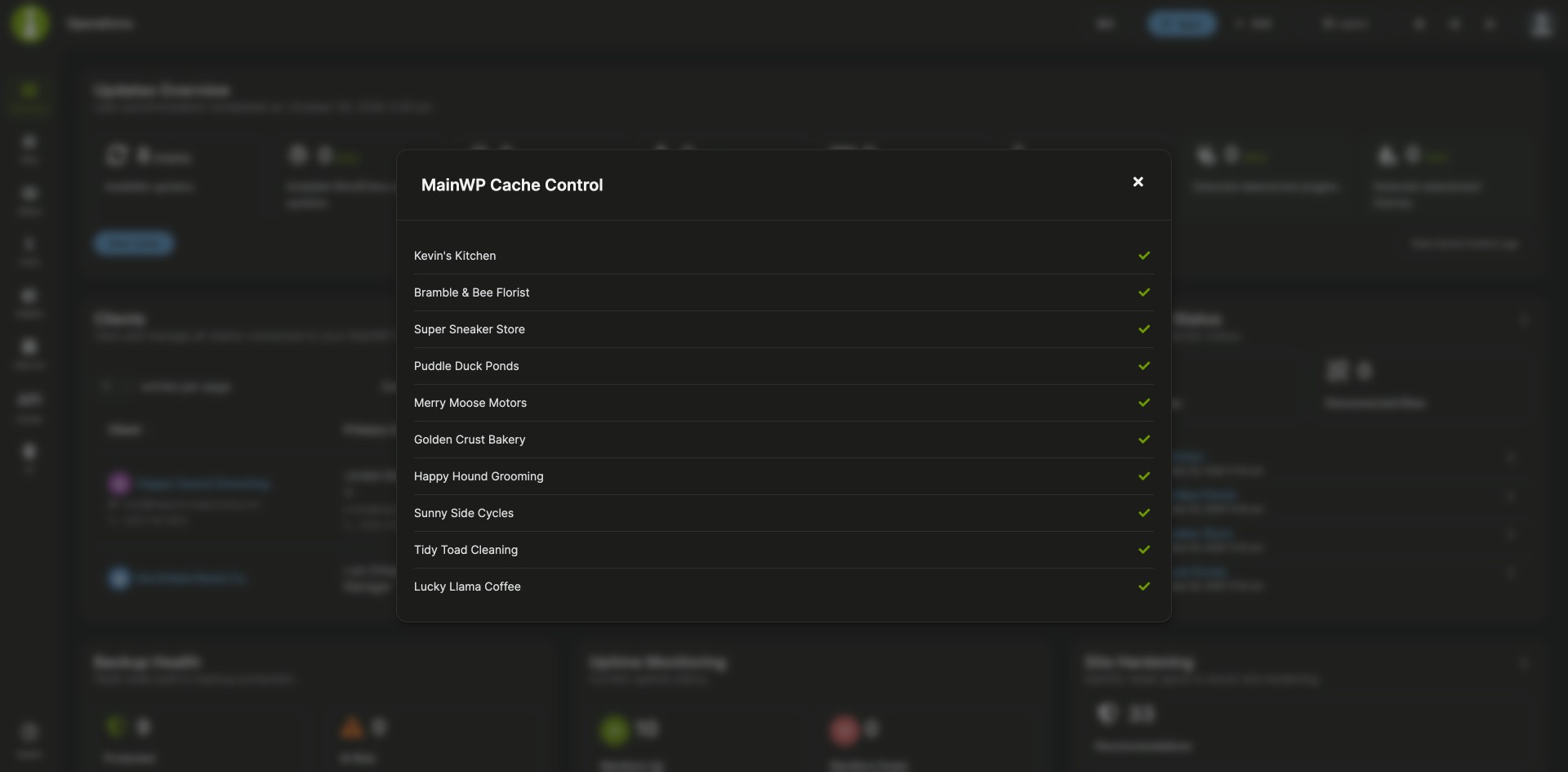

Purge child site caches after updates, Cloudflare included
The MainWP Cache Control Integration is a Pro MainWP add-on that purges the cache on your child sites after your MainWP Dashboard updates WordPress core, themes or plugins. It works with Cloudflare and 24 cache plugins and services, and it also purges one site, selected sites or all connected sites when you ask it to.
Clearing caches after an update run
After an update run, each site’s cache plugin or Cloudflare zone still holds the old pages until someone opens it and clears it, site by site, so visitors may keep seeing an older cached version. The MainWP Cache Control Integration sends that purge after each update, and one bulk action covers every site you select when you want to purge by hand.
Features
The MainWP Cache Control Integration sends purge requests to the cache plugin or Cloudflare setup each child site already uses.
| Feature | What it means for you |
|---|---|
| Automatic purge after updates | Turn on Automatically purge cache, and the cache is purged after your MainWP Dashboard updates WordPress core, themes or plugins on a child site. |
| Supported cache plugins and services | AccelerateWP, Autoptimize, Breeze, Cache Enabler, Comet Cache, FastPixel Cache, FlyingPress, Hummingbird Performance, LiteSpeed Cache, Nginx Helper, Nitropack, Pressable Cache Management, Rocket.net CDN Cache Plugin, RunCloud Hub, Seraphinite Accelerator, SiteGround Optimizer, Swift Performance, Swift Performance Lite, Swis Performance, W3 Total Cache, WP Fastest Cache, WP Optimize, WP Rocket and WP Super Cache. |
| Cloudflare cache purging | Connect Cloudflare with an email and API key or an API token, globally or per site. When a site uses both Cloudflare and a supported cache plugin, both are purged in one operation. When the Rocket.net CDN Cache Plugin is detected, the separate Cloudflare purge is skipped. |
| Manual purge | Select sites on Sites > Manage Sites and run the Purge Cache (Cache Control) bulk action, or click Clear Cache in the Updates Overview widget on the Operations page or a site’s Overview page. |
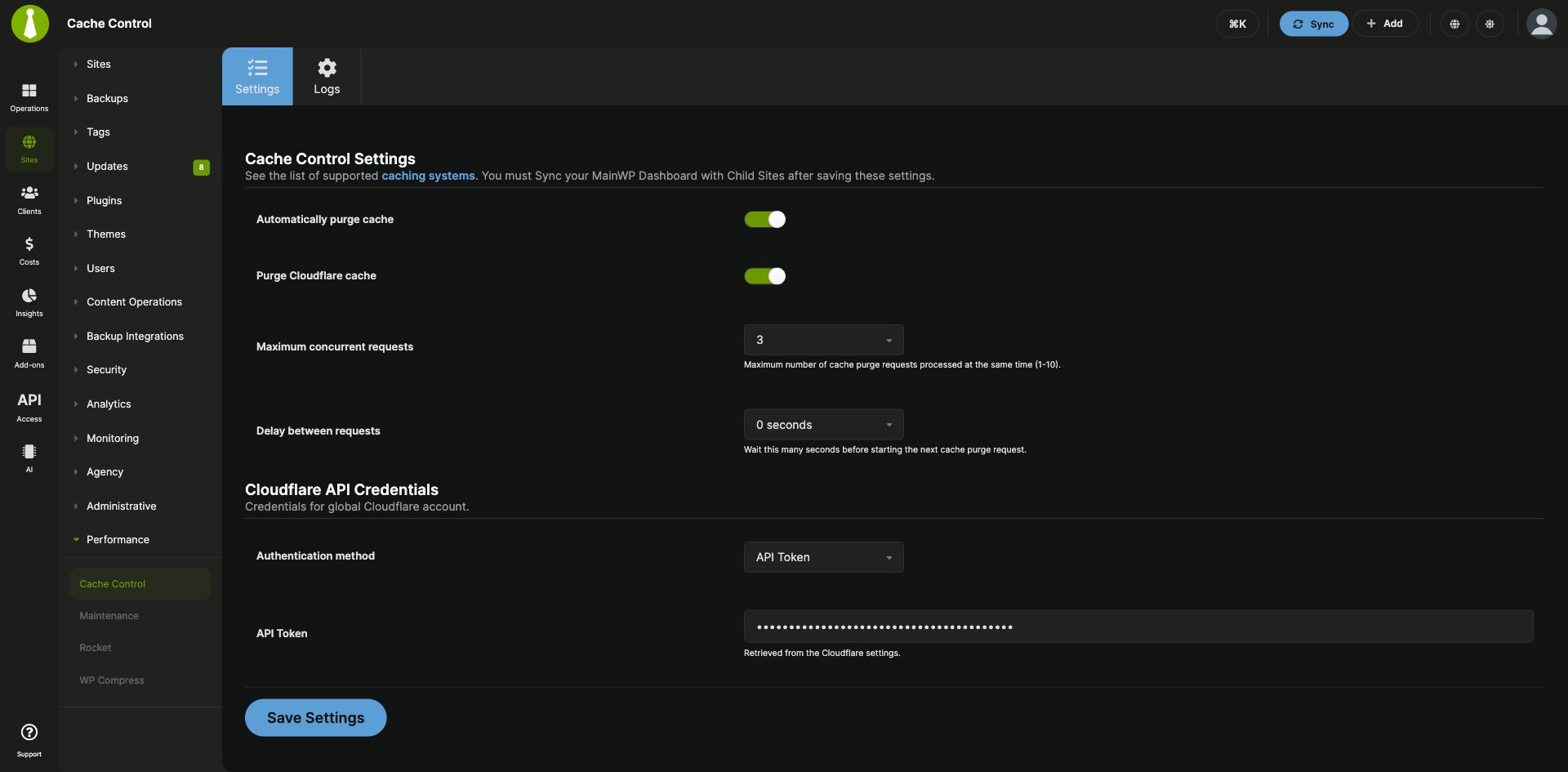
| Bulk purge speed control | Set Maximum concurrent requests (1 to 10, default 3) and Delay between requests (0 to 10 seconds, default 0) to keep bulk purges within what your server, hosting and Cloudflare account allow. |
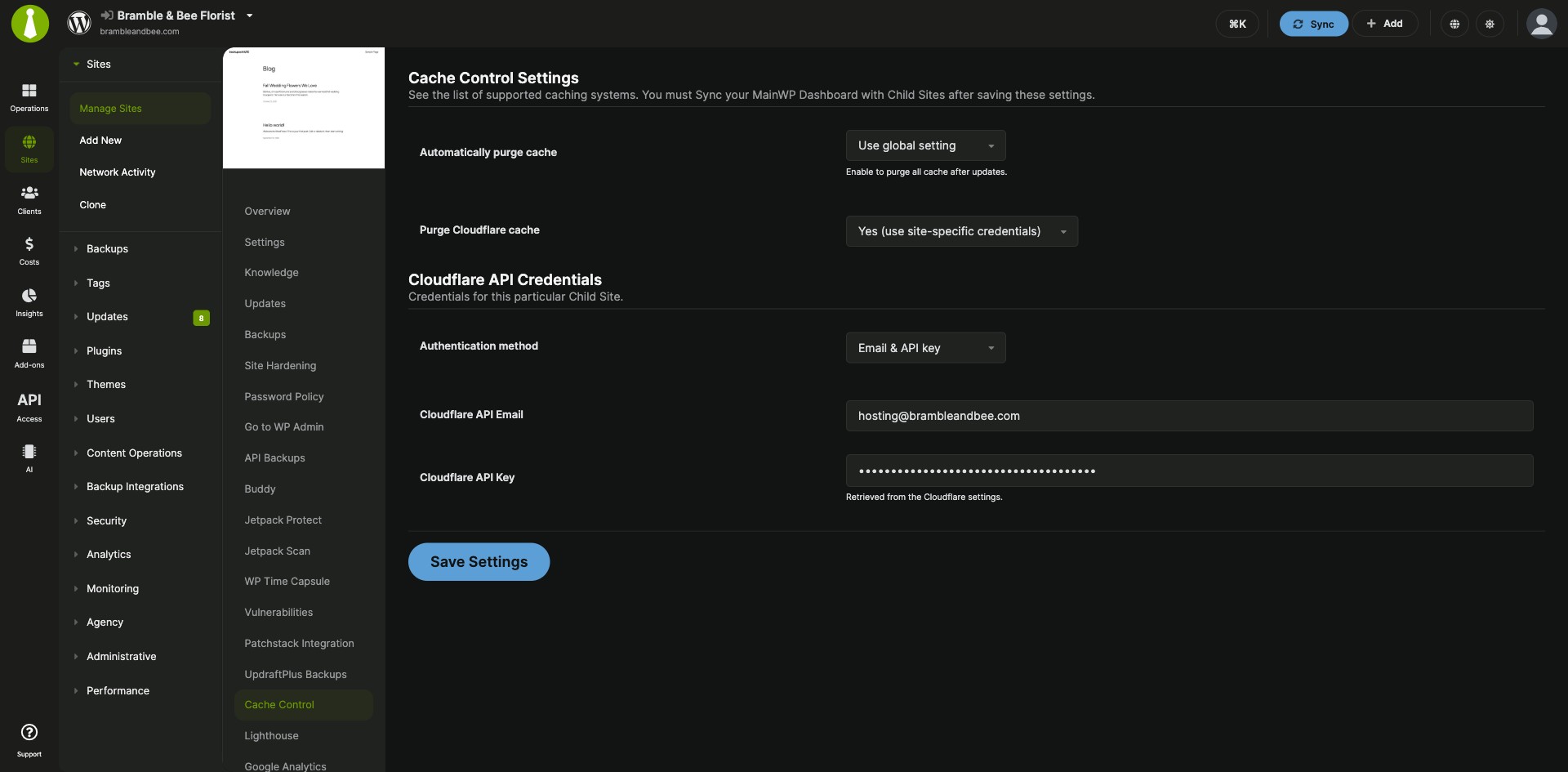
| Per-site settings | Give a site its own automatic purge setting and its own Cloudflare credentials, or turn Cloudflare purging off for that site. |
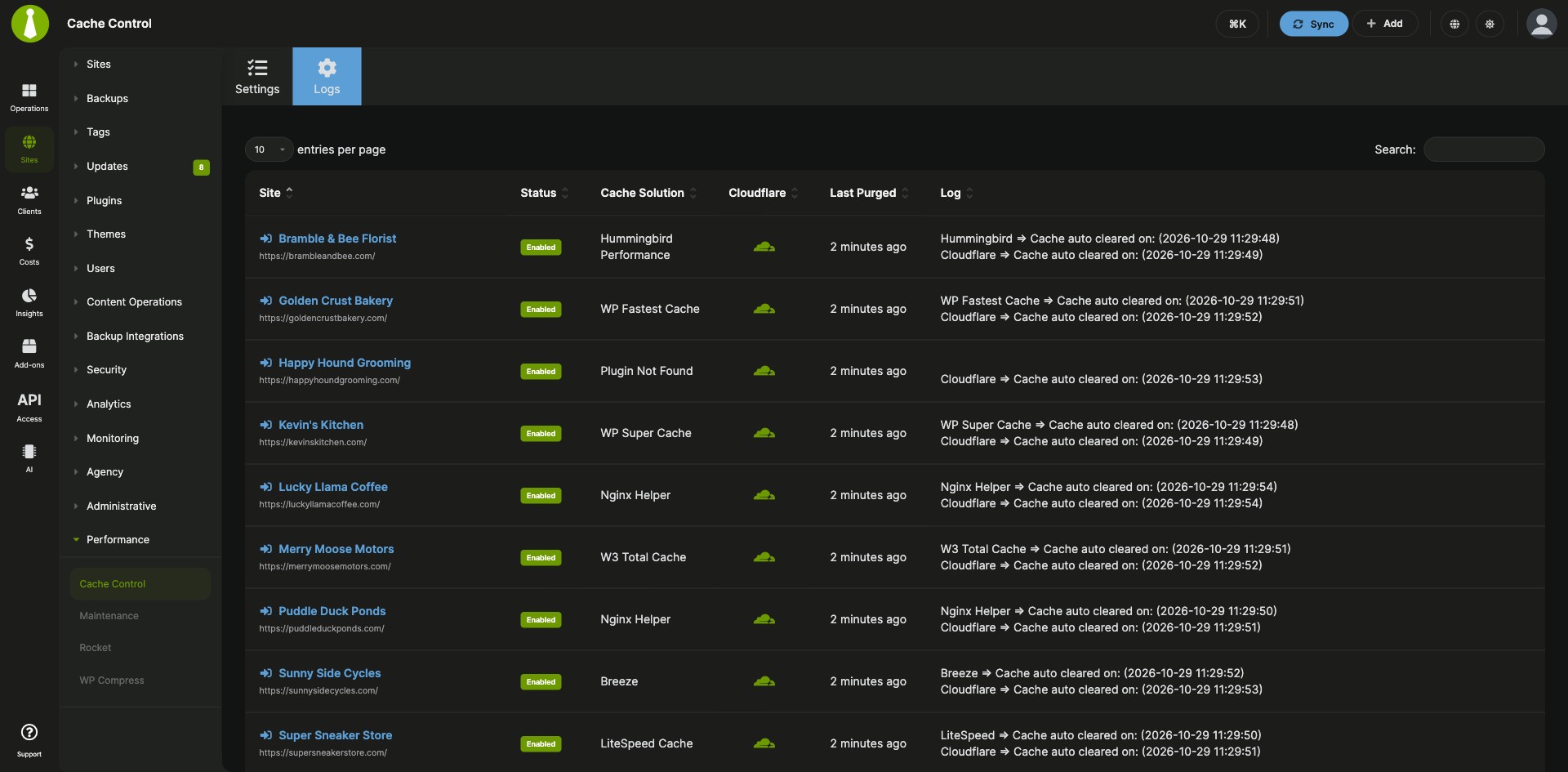
| Per-site results, logs and retry | Each site gets its own result after a bulk purge, with a partial result when the cache plugin and Cloudflare purges end differently. Sites that return a warning or error stay available to retry, and the Logs page shows each site’s cache solution, Cloudflare status, last purge time and returned messages. |
| MainWP Abilities API | Version 5.3 adds abilities to read a site’s cache status, manage purge settings, validate stored Cloudflare credentials and purge a single site’s cache. |
Requirements
The MainWP Cache Control Integration goes on your MainWP Dashboard, and each child site needs a cache for it to purge: a supported plugin or service, or Cloudflare.
| Item | Requirement |
|---|---|
| License | MainWP Pro |
| Child sites | A supported cache plugin or service activated and configured on each child site you want to purge, or Cloudflare purging configured for that site. For WP-Optimize, turn on page caching in its settings. |
| Site sync | Sync your sites after you configure their caching so your Dashboard receives the detected cache information |
| Cloudflare (optional) | A Cloudflare email and API key, or an API token with the Zone – Read and Cache Purge zone permissions, scoped to the zones of every site that uses it |
Setup: global settings, site overrides, manual purge
Setting up the MainWP Cache Control Integration takes one settings page, with optional per-site overrides and a bulk action for purging by hand.
Set the global cache settings
- In your MainWP Dashboard, go to MainWP > Add-ons > Cache Control.
- Turn on Automatically purge cache.
- To purge Cloudflare too, turn on Purge Cloudflare cache, select Email & API key or API Token, and enter your Cloudflare credentials.
- Set Maximum concurrent requests and Delay between requests for bulk purges.
- Click Save Settings, then sync your child sites so they receive the new settings.
Give one site its own settings
- Go to MainWP > Sites > Manage Sites and open the site’s dashboard.
- Open the site’s Cache Control page.
- For Automatically purge cache, choose Yes, No or Use global setting.
- For Purge Cloudflare cache, choose Use global setting, Yes (use site-specific credentials) or No (disabled for this site). If you choose Yes, enter that site’s Cloudflare credentials.
- Click Save Settings, then sync the site.
Purge the cache by hand
- Go to MainWP > Sites > Manage Sites and select the sites.
- Choose Purge Cache (Cache Control) from the bulk actions menu and click Apply.
- Review each site’s result, sync the sites, and check MainWP > Add-ons > Cache Control > Logs.
Full instructions for settings, Cloudflare credentials and logs: MainWP Cache Control Integration documentation.
How purge requests reach each site
The MainWP Cache Control Integration sends purge requests from your MainWP Dashboard to the cache you already run on each child site. MainWP Child detects the site’s cache plugin and reports it to your Dashboard when the site syncs, and it uses your Cloudflare credentials to find the site’s zone and purge its cache. Cloudflare API keys and tokens are kept in encrypted storage. For sites that run WP Rocket, the WP Rocket Integration also manages WP Rocket settings and clears and preloads its cache from your Dashboard.
Cache Control FAQ
Which caching plugins does Cache Control support?
The MainWP Cache Control Integration supports Cloudflare and 24 cache plugins and services, including WP Rocket, LiteSpeed Cache, W3 Total Cache, WP Super Cache, WP Fastest Cache, SiteGround Optimizer, Breeze, FlyingPress, Nitropack and WP Optimize. The full list is in the Features table.
What permissions does the Cloudflare API token need?
The Cloudflare API token for the MainWP Cache Control Integration needs two zone permissions: Zone – Read, so MainWP Child can find the site’s zone, and Cache Purge, so it can purge that zone’s cache. Scope the token to the zones you want to manage. A token in the global settings has to cover the zones of every site that uses it.
What does a warning after a purge mean?
A warning from the MainWP Cache Control Integration means the site needs a cache it can purge. Activate and configure a supported cache plugin (for WP-Optimize, turn on page caching) or turn on Cloudflare purging for the site, sync it, and run the purge again.
Where do I get support?
MainWP support handles issues with the MainWP Cache Control Integration itself, at MainWP support. Cloudflare handles issues with your Cloudflare account and service; see cloudflare.com.