
Connect AI to Your Agency Context with MainWP 6.3 and MainWP MCP
Knowledge for sites, clients, and agency workflows.

MainWP Early Access

Join the MainWP Early Access Program to access and test new MainWP features before public release. Download, explore, and provide feedback to help shape MainWP plugin. Perfect for developers and agencies looking to stay ahead with exclusive tools and enhancements.

MainWP 6.4 Highlight - MainWP Built-In Backups

Your sites. Your storage. Backups built into MainWP.

MainWP Built-In Backups brings scheduled backups, offsite storage, and snapshot restores into your Dashboard - without an additional backup plugin on each site.


  • Back up on your schedule. Create full, database-only, files-only, or incremental backups. Automate recurring tasks or use Back Up Now before making a change.

  • Choose where your backups live. Keep copies on your Dashboard server or send them to Dropbox, Google Cloud Storage, SFTP, or S3-compatible storage. Set retention rules to manage storage automatically.
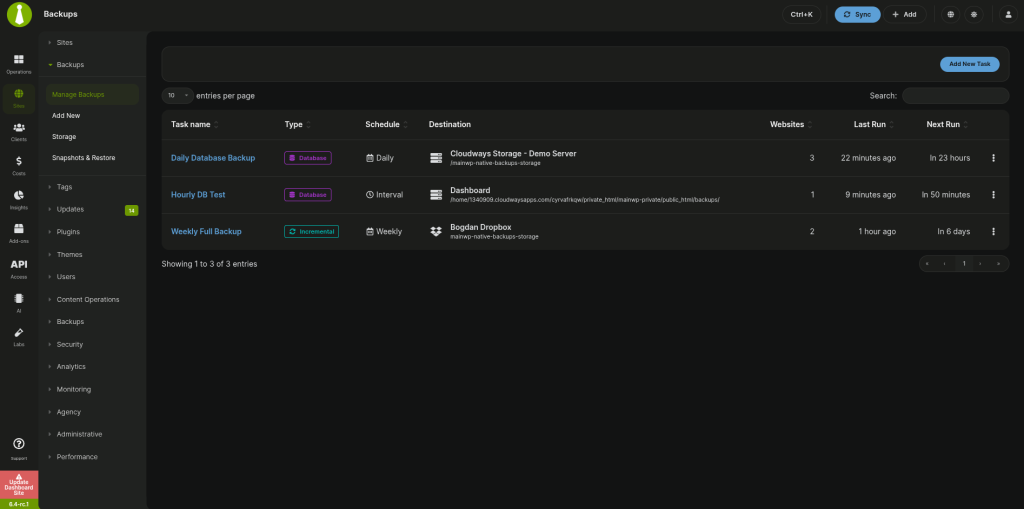
MainWP Backup Tasks
MainWP Snapshots
  • See which sites need attention. Monitor backup health across your sites from one Dashboard, with indicators that help you spot missing or aging backups.

  • Restore with safeguards. Choose a snapshot and run preflight checks before restoring. Take an optional safety backup first, with rollback available when an eligible safety backup exists.

To get notified when we make updates to early release canidates sign up here!

Name

MainWP Pre-Release Downloads

Early Access Add-on

The MainWP Early Access Extension lets you update your MainWP Dashboard and Child plugins to pre-release versions. Explore new features early, provide feedback, and help shape upcoming releases.
Already using MainWP Essentials or Pro? The Early Access add-on is included in your plan and can be installed like any other add-on.
GET MAINWP EARLY ACCESS
New to MainWP? Sign up for any plan to get access.
As always, please report any issues through our Discord Channel.

Setting up your Testing Environment

For New Test Sites:

Simply download and install both the Dashboard and Child plugins as you normally would. This update is designed to be stable, but we recommend testing on dedicated sites or sub-domains to ensure compatibility with your server setup.

For Existing Sites:

If you prefer testing on your live environment, please follow these steps carefully:

Upgrade the Dashboard Plugin

  1. Download the MainWP Dashboard ZIP.
  2. Deactivate and delete the current version from your MainWP Dashboard site.
  3. Install and activate the new plugin.

Upgrade your Child Plugins

  1. Download the MainWP Child ZIP.
  2. Navigate to your MainWP Dashboard > Sites > Plugins > Install Plugins > Upload .zip file.
  3. Choose the sites for the upload, ensuring both “Activate after installation” and “Overwrite existing” options are selected.

Complete the installation to update your Child sites.

MainWP Dashboard 6.4 changelog

6.4-rc.3 - 10-23-2026

* Fixed: Improved handling of quotes, commas, backslashes, and failed-row retries in Users CSV imports.
* Fixed: Server Information and Quick Setup consistently show the Dashboard’s PHP 8.3 requirement; removed an obsolete PHP upgrade notice.
* Fixed: Connectivity charts display only Connected, Disconnected, and Suspended sites, with accurate proportions.
* Fixed: Resolved PHP compatibility warnings in REST settings handling.
* Updated: Imported user passwords are excluded from import logs and failed-row CSV downloads.
* Updated: Site Hardening now checks PHP versions against supported branches and security releases using cached PHP.net data.
* Updated: Renamed the backup extensions navigation group to Backup Integrations.
* Updated: Clarified Knowledge help text and standardized knowledge modal title capitalization.

6.4-rc.2 - 10-22-2026

* Fixed: Cost Tracker settings now follow the dedicated settings permission.
* Fixed: Sites filters and totals refresh correctly when connection status changes after syncing or reconnecting.
* Updated: Improved Team Control permissions for API access and background tasks, respecting assigned rights and site access.
* Updated: Improved backup integrity checks, damaged-backup reporting, cloud-copy validation and incremental backup recovery.
* Updated: Improved backup failure messages, progress reporting, reconnect results and site removal feedback.
* Updated: Strengthened backup storage, downloads and restores, including checks for publicly accessible backup folders.
* Updated: Improved handling of site names, messages, custom fields and remote requests across the Dashboard.

6.4-rc.1 - 10-20-2026

* Added: Native Backups (beta) — back up and restore your WordPress sites directly from MainWP, without an additional backup plugin. Schedule full, database-only, files-only, or incremental backups; store copies locally or offsite using S3-compatible storage, Google Cloud Storage, Dropbox, or SFTP; and restore snapshots with optional safety backups and rollback. Includes encryption, automatic retention, backup health monitoring, and management through the Abilities API.
* Fixed: Invalid site tag updates through the REST API could remove existing tag assignments.
* Fixed: Invalid client-note values could overwrite existing notes instead of being rejected.
* Fixed: Uptime monitor settings now preserve disabled down confirmations and correctly clear repair attempts after a successful save.
* Fixed: Advanced Settings now displays a validation message when the Child request timeout is invalid.
* Fixed: Improved Add Site success notices and connection error messages.
* Updated: Improved handling and cleanup of encrypted HTTP authentication details and extension license keys.
* Updated: Connection failure details now hide child-site response bodies to help protect private information.
* Dev: Added the `mainwp_get_sql_where_allow_access_sites` hook for retrieving the existing site-access query conditions.
* Dev: Added the `mainwp_developer_generate_tweaked_request_params` hook for configuring outgoing request parameter mappings, with matching MainWP Child support.

Compatibility: MainWP Dashboard now requires PHP 8.3 or newer. Native Backups requires the matching MainWP Child release. File backups and restores are currently unavailable on hosting configurations where `wp-content` is outside the WordPress core folder; database-only backups and restores remain supported.

MainWP Child 6.4 Changelog

MainWP Child 6.4-rc.2

* Fixed: Missing Cache Control sync data when Dashboard connections use the front-end fallback.
* Fixed: Long filenames and files changing during TAR backup creation could produce incomplete or damaged archives. Oversized files are now skipped and reported.
* Fixed: Improved preservation of international characters in fallback database exports.
* Fixed: Leftover database dump files are cleaned up after files-only restores.
* Fixed: Child settings redirects and access to Tools pages hidden by branding.
* Fixed: Code Snippets output now preserves valid text when invalid characters are encountered.
* Updated: Strengthened backup file permissions, archive validation, database restore checks and clone extraction.
* Updated: Improved protection of database credentials and temporary files during cPanel database backups.

MainWP Child 6.4-rc.1

* Added: Support for MainWP Native Backups (beta), enabling Dashboard-managed full, database-only, files-only, and incremental backups, resumable transfers, and snapshot restores without an additional backup plugin.
* Fixed: Registered the System Monitor’s one-minute cron schedule before initialization to prevent scheduling errors.
* Fixed: Viewing the Menus page no longer captures unnecessary snapshots of every navigation menu. Menu and Customizer changes continue to be captured when saved.
* Fixed: Change logging now preserves the existing database error-suppression setting after checking for a table.
* Fixed: The PHP Error Reporting hardening check now correctly detects enabled error display, including during signed Dashboard requests. Both display_errors and display_startup_errors must be disabled for the check to pass.

Search MainWP.com

[searchwp_form id="1"]