
Jetpack Protect Integration
See the vulnerabilities Jetpack Protect finds on your child sites and update affected items from MainWP.

Free Jetpack Protect vulnerability checks in one table
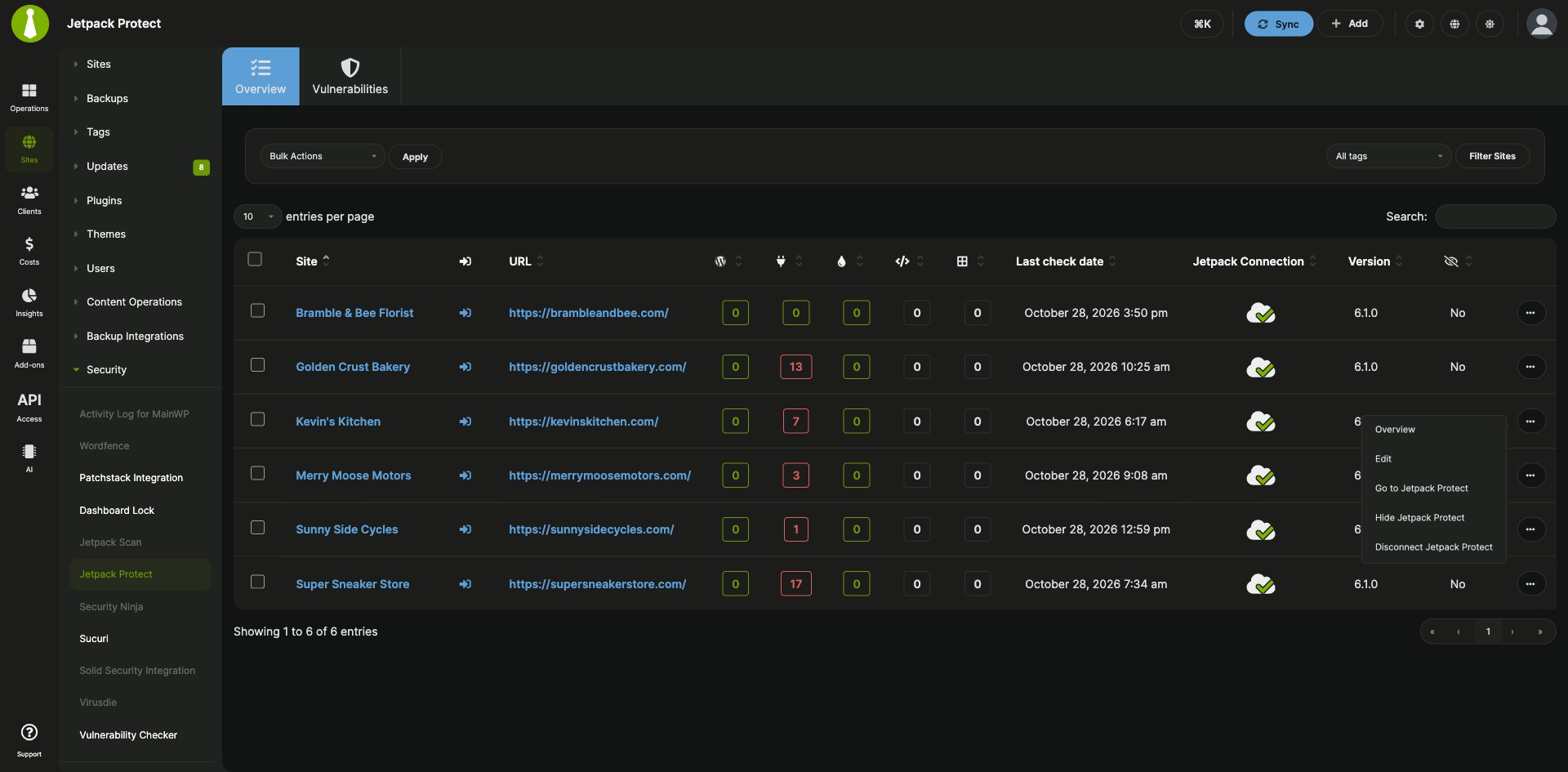
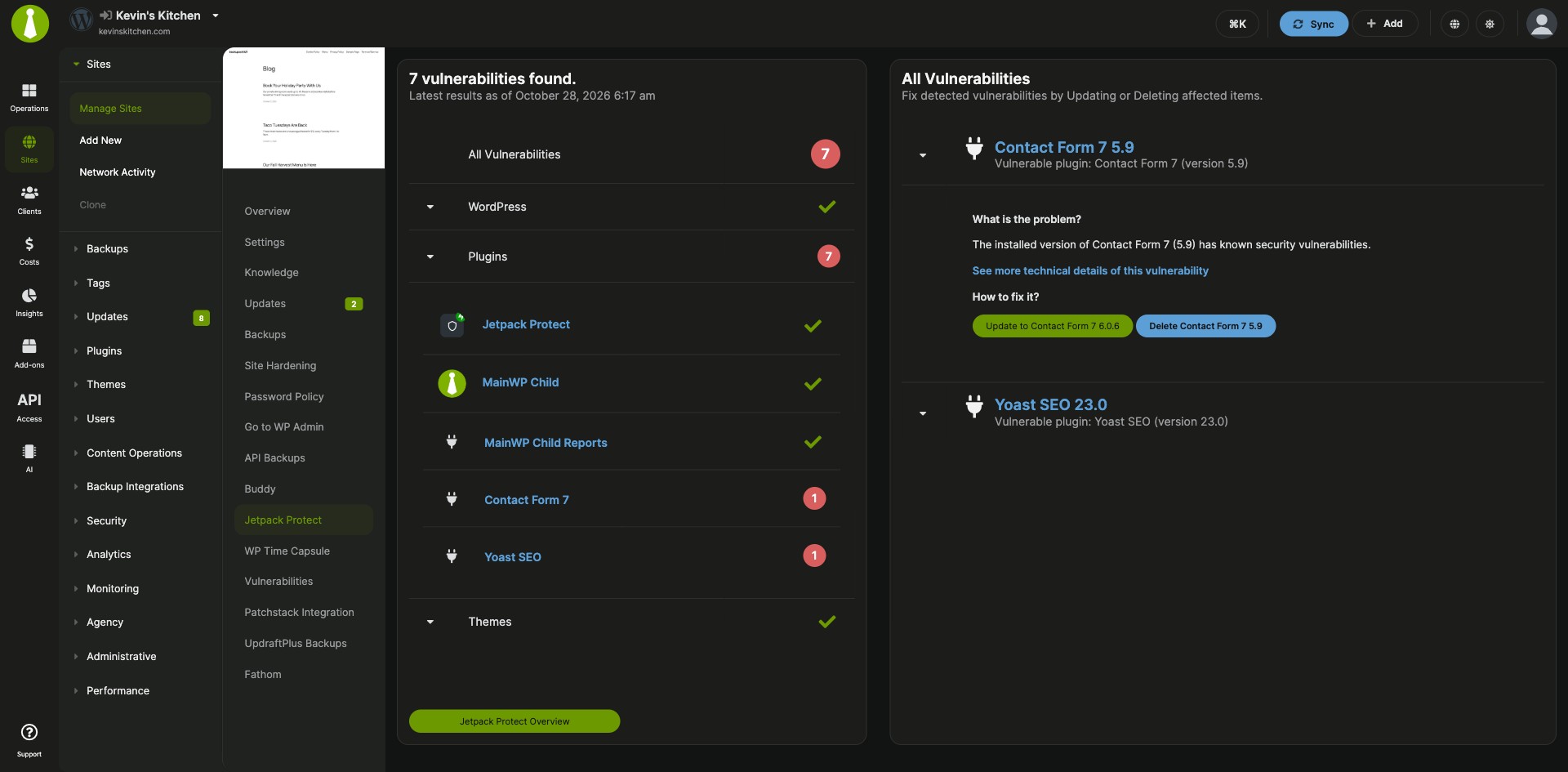
The Jetpack Protect Integration is a free MainWP add-on that shows the vulnerabilities Jetpack Protect finds on your child sites in your MainWP Dashboard. One table lists each site’s last scan and its WordPress core, plugin and theme vulnerabilities, and you can update to the fixed version from there.
Scan results spread across your sites
Jetpack Protect runs on each child site, so reading its scan results and fixing what it found means opening every site. The Jetpack Protect Integration brings the results from all your sites to one page on your MainWP Dashboard, where you update an affected item, or connect, update or hide the Jetpack Protect plugin on many sites at once.
Features
The Jetpack Protect Integration gives you the scan results, the fixes and the plugin controls for every connected child site.
| Feature | What it means for you |
|---|---|
| Vulnerabilities tab | See every child site with Jetpack Protect installed, when it was last scanned, and how many vulnerabilities were found in WordPress core, plugins, themes, files and database items. Click a site’s row to see the details. File and database counts need Jetpack Scan data. |
| Fix from your MainWP Dashboard | Click a vulnerability to read more about it. For supported WordPress core, plugin and theme vulnerabilities, update to the fixed version when one is available. For plugin and theme vulnerabilities, you can also delete the affected item. |
| Overview tab | Check each site’s Jetpack Connection status. The row menu has Overview, Edit, Go to Jetpack Protect, Hide or Unhide Jetpack Protect, and Connect or Disconnect Jetpack Protect. |
| Bulk actions | Activate, update, hide, unhide, connect or disconnect Jetpack Protect on many child sites at once. |
| Pro Reports tokens | Add Jetpack Protect results to client reports in Pro Reports with [jetpack.protect.plugins.count], [jetpack.protect.themes.count], [jetpack.protect.plugins], [jetpack.protect.themes] and [jetpack.protect.wp]. |
| REST API endpoint | Read scan results from your own tools through wp-json/mainwp/v1/jetpack-protect/result on the MainWP REST API. |
Requirements
The Jetpack Protect Integration reads the scans that the free Jetpack Protect plugin runs on each child site.
| Item | Requirement |
|---|---|
| License | Free, included in MainWP Essentials and MainWP Pro |
| MainWP Dashboard | The Jetpack Protect Integration installed and activated on your Dashboard site |
| Child sites | The free Jetpack Protect plugin installed and active on each child site you want to scan, and the site connected to Jetpack |
| File and database counts (optional) | Jetpack Scan data for the site. See the Jetpack Scan Integration. |
| REST API (optional) | The MainWP REST API turned on with an API key |
Setup: install, activate and connect your sites
The Jetpack Protect Integration needs the plugin on your child sites, the add-on on your MainWP Dashboard, and a Jetpack connection for each site.
Install the Jetpack Protect plugin and the integration
- Install and activate the Jetpack Protect plugin on the child sites you want to scan.
- On your Dashboard, go to Add-ons > Manage Add-ons and click Install Add-ons.
- Select the Jetpack Protect Integration and click Install.
- When the installation finishes, click Activate Add-ons.
Connect your child sites to Jetpack
- Go to Add-ons > Security > Jetpack Protect. Sync all sites so every site with the plugin appears.
- A red X in the Jetpack Connection column marks the sites that still need connecting.
- Select the sites, choose Connect Jetpack from the Bulk Actions menu, and click Apply.
- Sync your sites again to get fresh data. The first Jetpack Protect scan can take some time after you connect.
Full instructions for the Vulnerabilities and Overview tabs and the REST API: Jetpack Protect Integration documentation.
Jetpack Protect FAQ
How often does Jetpack Protect scan my child sites?
Jetpack Protect scans your child sites once per day. After you fix a vulnerability, the Jetpack Protect Integration can take up to 24 hours to show the change on your MainWP Dashboard.
Can I fix a vulnerability from my MainWP Dashboard?
Yes, the Jetpack Protect Integration lets you update supported WordPress core, plugin and theme vulnerabilities to the fixed version when one is available. Open the Vulnerabilities tab, expand the site’s row and click the vulnerability. For plugin and theme vulnerabilities you can also delete the affected item.
Is the Jetpack Protect Integration free?
Yes, the Jetpack Protect Integration and the Jetpack Protect plugin are both free to download and use, and the integration is included in MainWP Essentials and MainWP Pro. The file and database counts on the Vulnerabilities tab come from Jetpack Scan data, and Jetpack Scan is a separate subscription. See the Jetpack Scan Integration.
Where do I get support?
The Jetpack team handles issues with the Jetpack Protect plugin itself. See jetpack.com. MainWP support handles issues with the integration.