
MainWP WooCommerce Status Extension
See sales, orders and stock for the WooCommerce stores on all your child sites in your MainWP Dashboard.


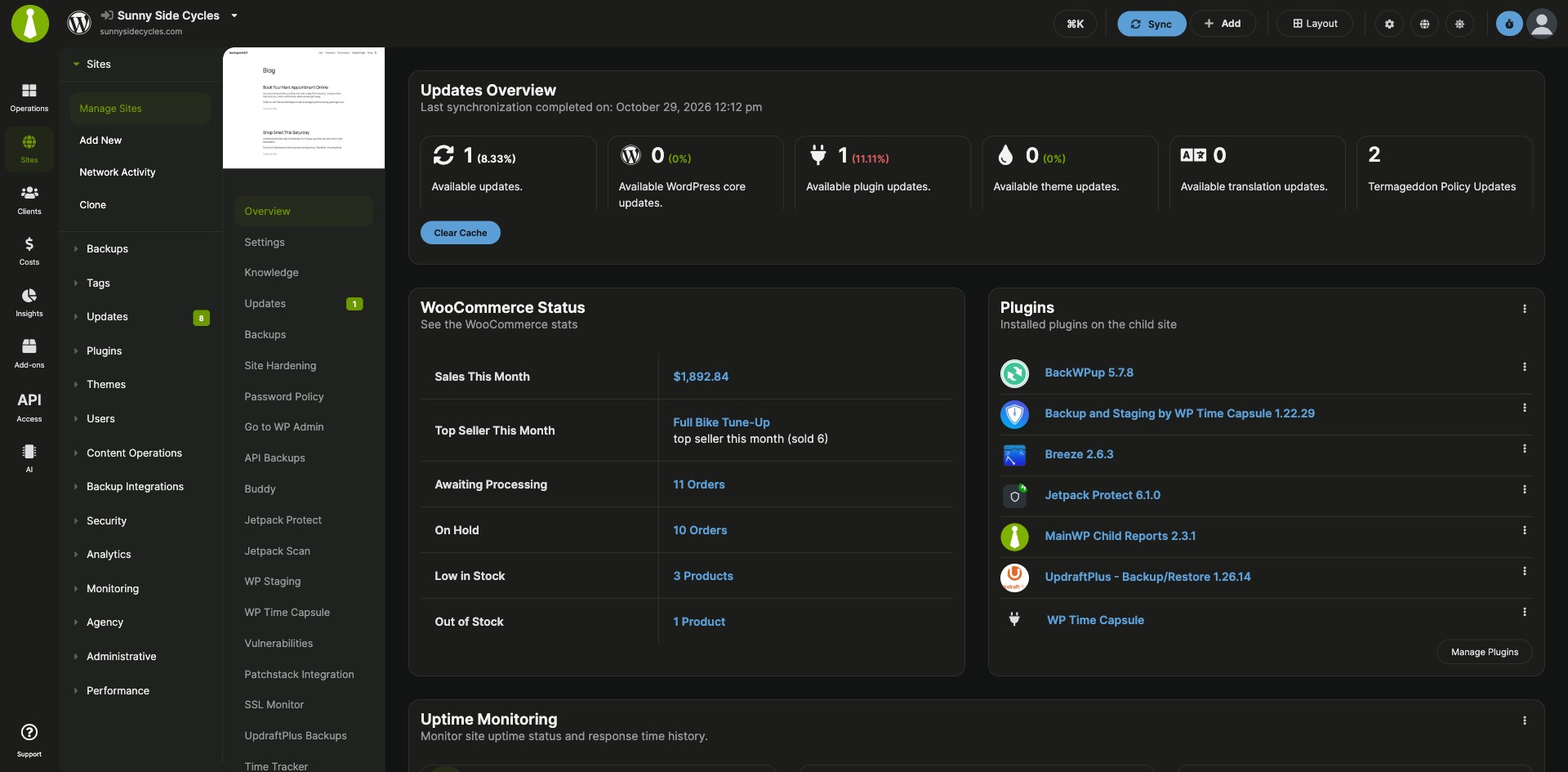
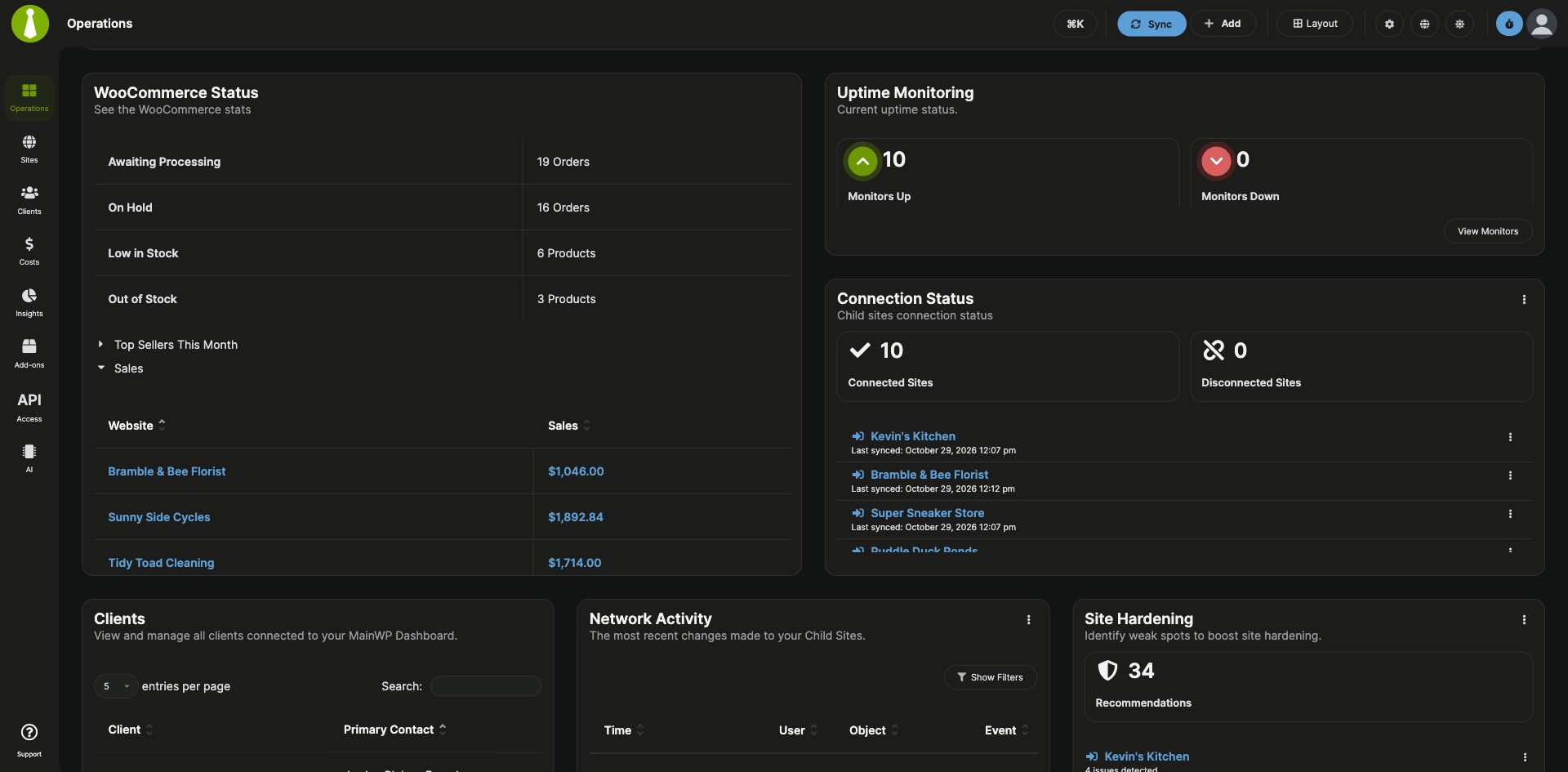
Monitor sales, orders and stock for all your WooCommerce stores from your MainWP Dashboard
The MainWP WooCommerce Status Extension is a Pro MainWP add-on that shows the WooCommerce status of every child site in one place. For each store you see recent sales, this month’s top seller, orders awaiting processing or on hold, and products low on stock or out of stock, with links that open the matching WooCommerce screen on the child site.
What the MainWP WooCommerce Status Extension replaces
Without the extension, you log in to each store to check its sales, find orders waiting on you, and spot products running out. With the MainWP WooCommerce Status Extension, those numbers for all your stores sit in one table and in Overview widgets, and one click takes you to the right WooCommerce page on the site that needs attention.
MainWP WooCommerce Status Extension features
| Feature | What it means for you |
|---|---|
| WooCommerce Status page | See every child site with WooCommerce installed and active on Sites > Monitoring > WooCommerce Status. |
| Sales and top seller | Sales Last 7 Days covers today and the previous six calendar days and sorts by its numeric value. Sales This Month and Top Seller This Month cover the current month. |
| Orders to handle | See how many orders are awaiting processing and how many are on hold on each store. |
| Stock alerts | See how many products are low on stock and how many are out of stock. |
| Links to WooCommerce screens | Click a number in the table to open the matching WooCommerce page on that child site. |
| Overview widgets | Each site’s Overview page gets a WooCommerce Status widget with its sales, top seller, order and stock counts. The MainWP Overview widget shows combined order and stock totals, plus Top Sellers and Sales broken down by child site. |
| Pro Reports tokens | Add store numbers to client reports with Pro Reports: [wcomstatus.sales], [wcomstatus.topseller], [wcomstatus.awaitingprocessing], [wcomstatus.onhold], [wcomstatus.lowonstock] and [wcomstatus.outofstock]. |
| Database health check | The add-on’s WooCommerce status table is registered with the MainWP Database Health Check, so you can confirm the add-on is set up correctly. |
MainWP WooCommerce Status Extension requirements
| Item | Requirement |
|---|---|
| License | MainWP Pro (included in the Pro Bundle) |
| MainWP Dashboard | The MainWP WooCommerce Status Extension, installed only on your Dashboard site |
| Child sites | The WooCommerce plugin installed and activated on each child site you want to monitor |
| Sales Last 7 Days | MainWP Child 6.1.7 or later on the child site |
| Report tokens (optional) | The MainWP Pro Reports Extension |
How to set up the MainWP WooCommerce Status Extension
Install the add-on and WooCommerce
- Install the MainWP WooCommerce Status Extension on your MainWP Dashboard, the same way as any other MainWP add-on.
- Go to Sites > Plugins > Install Plugins, search for WooCommerce, and select Install this Plugin.
- Select your child sites, keep Activate after installation selected, and complete the installation.
- Sync your MainWP Dashboard so it detects WooCommerce and loads the store data.
Check your stores
- Go to MainWP > Sites > Monitoring > WooCommerce Status.
- Sort by Sales Last 7 Days, or click any number to open that WooCommerce page on the child site.
Full instructions, including installing WooCommerce directly on a child site: MainWP WooCommerce Status Extension documentation.
How the MainWP WooCommerce Status Extension works
The MainWP WooCommerce Status Extension runs only on your MainWP Dashboard site and shows the WooCommerce status data your Dashboard stores for each child site. When you sync your sites, your Dashboard detects WooCommerce and refreshes that data.
MainWP WooCommerce Status Extension FAQ
Does the MainWP WooCommerce Status Extension need WooCommerce on my child sites?
Yes, WooCommerce must be installed and activated on each child site you want to monitor. The extension itself is installed only on your MainWP Dashboard site.
A store is missing from the WooCommerce Status page. What should I check?
Make sure WooCommerce is installed and active on that child site, then sync your sites. The page lists only sites with WooCommerce installed and active, and your Dashboard detects WooCommerce when the site syncs.
What does Sales Last 7 Days include?
Sales Last 7 Days counts sales from today and the previous six calendar days. The column needs MainWP Child 6.1.7 or later on the child site.
Can I add WooCommerce store numbers to client reports?
Yes, the MainWP Pro Reports Extension has WooCommerce Status tokens. [wcomstatus.sales] and [wcomstatus.topseller] cover the report’s date range, and the order and stock tokens show the current counts.
What do I need to pay for?
The MainWP WooCommerce Status Extension needs MainWP Pro and is included in the Pro Bundle. The report tokens also need the MainWP Pro Reports Extension, which is in the Pro Bundle too.
Where do I get support?
The WooCommerce team handles issues with the WooCommerce plugin itself. See woocommerce.com. MainWP support handles issues with the integration.