Opens in a new tab

Save $50 Every Year with MainWP

Get $50 off the MainWP Yearly Plan this Black Friday. Your discount renews every year! Claim Your $50 Discount

Manage 5 or 500 WordPress sites from your own Dashboard
Unlimited sites. No per-site fees.

MainWP is free, self-hosted software for managing multiple WordPress sites. Update, back up, and monitor every site you manage without logging in to each one.
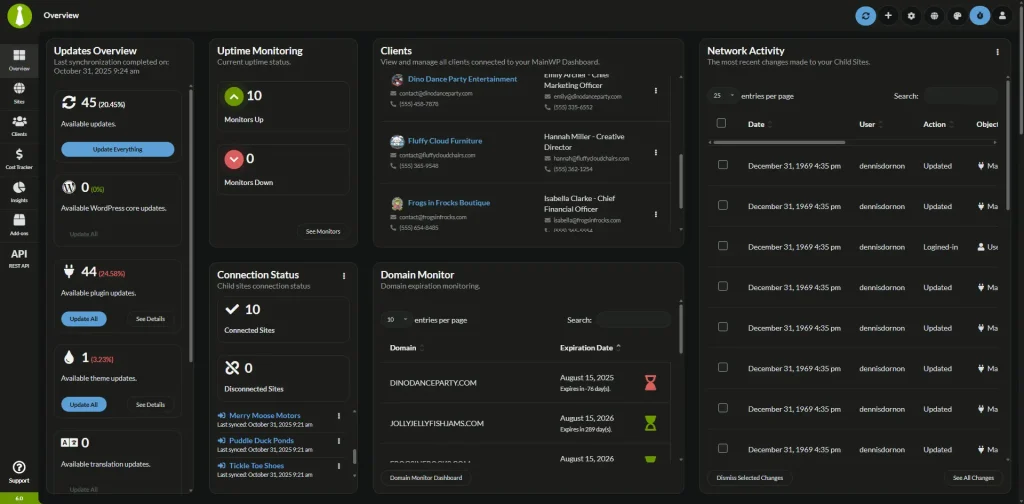
MainWP v6 User Interface - Video Thumbnail
Over 20,000 active MainWP Dashboards, over 700,000 sites running MainWP Child, and over 2,200 five-star reviews on WordPress.org.

Installed like any WordPress plugin, with no separate server software.

Run the free MainWP Dashboard plugin on a WordPress site you control and MainWP Child on every site you manage. Your MainWP Dashboard runs on standard WordPress hosting.
Why MainWP

Why do WordPress professionals and agencies choose a self-hosted manager?

Your MainWP Dashboard runs on your own server, so you control your hosting, your client data, and who can change client sites.

Self-hosted on your own terms

Install MainWP on a WordPress host that meets MainWP’s requirements. You control uptime, server backups, and when updates run.

No per-site fees

Keep your care-plan margins as you add sites. The free MainWP Core covers unlimited sites, and MainWP Pro is one flat price with no MainWP per-site fees.

Private by design

Your client list, site data, and history live on the server that hosts your MainWP Dashboard. When a client asks where their data sits, your answer stays short.

Signed connections per site

Your MainWP Dashboard signs requests to each child site with a site-specific key. MainWP Child verifies the signature before it acts. HTTPS protects the connection.

Open source on GitHub

Read every line of code before it runs on a client site. MainWP Dashboard and MainWP Child are open source under the GPL, and pull requests are welcome.

Scriptable and built to extend

Automate routine maintenance with the MainWP REST API, Abilities API, WP-CLI, and MainWP Control, or build your own add-ons on over 1,000 hooks and filters.
Features

What does MainWP do for your care plans?

The weekly maintenance behind every care plan runs from your MainWP Dashboard. Solo WordPress pros get the core tools free. Growing agencies add MainWP Pro for branded client reports and team roles. See all free Core features or compare MainWP Core and MainWP Pro.

Update every client site from one screen

See every plugin, theme, translation, and WordPress core update across your sites. Run updates in bulk or site by site, set automatic updates, and ignore any update until you test it.
MainWP Updates Feature

Get an email when a client site goes down

Uptime Monitoring checks every client site on your schedule, from every 5 minutes to once a day, and emails you when a site goes down and when it comes back up.
MainWP Monitor feature

Show clients what their care plan does Pro
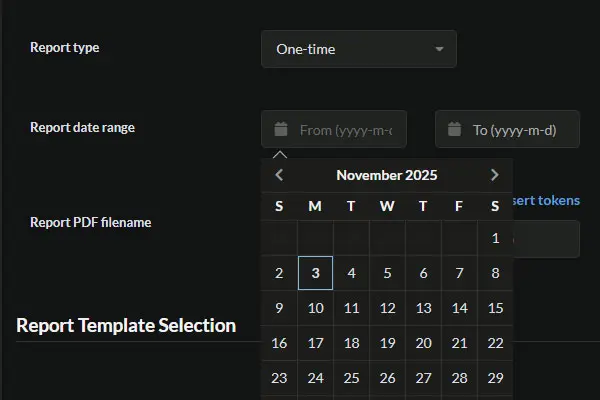
Send branded client reports covering updates, uptime, and results from your backup and security add-ons with Pro Reports, so clients see the work behind their retainer.
MainWP Branded reports

Back up before you update

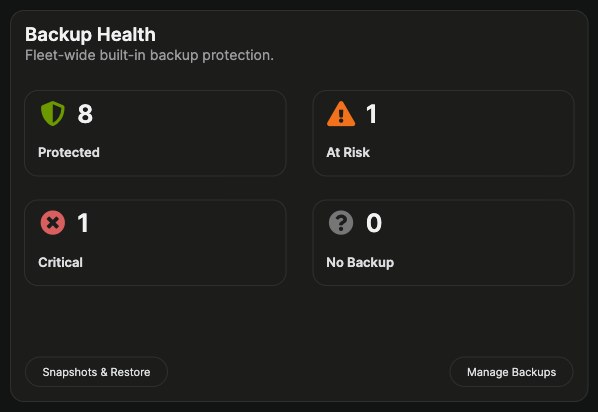
MainWP Built-In Backups sends scheduled backups, with optional encryption, to S3-compatible storage, Google Cloud Storage, Dropbox, pCloud, or SFTP. Require a backup before updates, check Test Restore results, and restore from your Dashboard. Included in the free MainWP Core.
MainWP Backup Health widget counting child sites by backup status: 8 Protected, 1 At Risk, 1 Critical, 0 No Backup

Give technicians access without your admin login Pro

Create custom roles with Team Control so each technician works within the client sites, add-ons, and permissions you assign.
Team Management

Keep track of every license and renewal
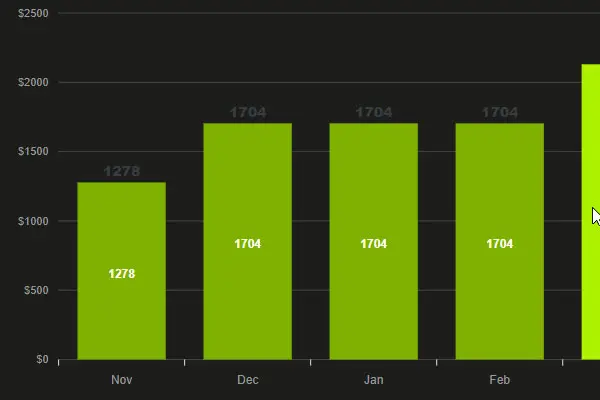
Cost Tracker records what each client site costs you in hosting, plugins, and licenses, right next to each client profile. Spot renewals early and price every care plan from real numbers.
MainWP Cost Tracker Feature
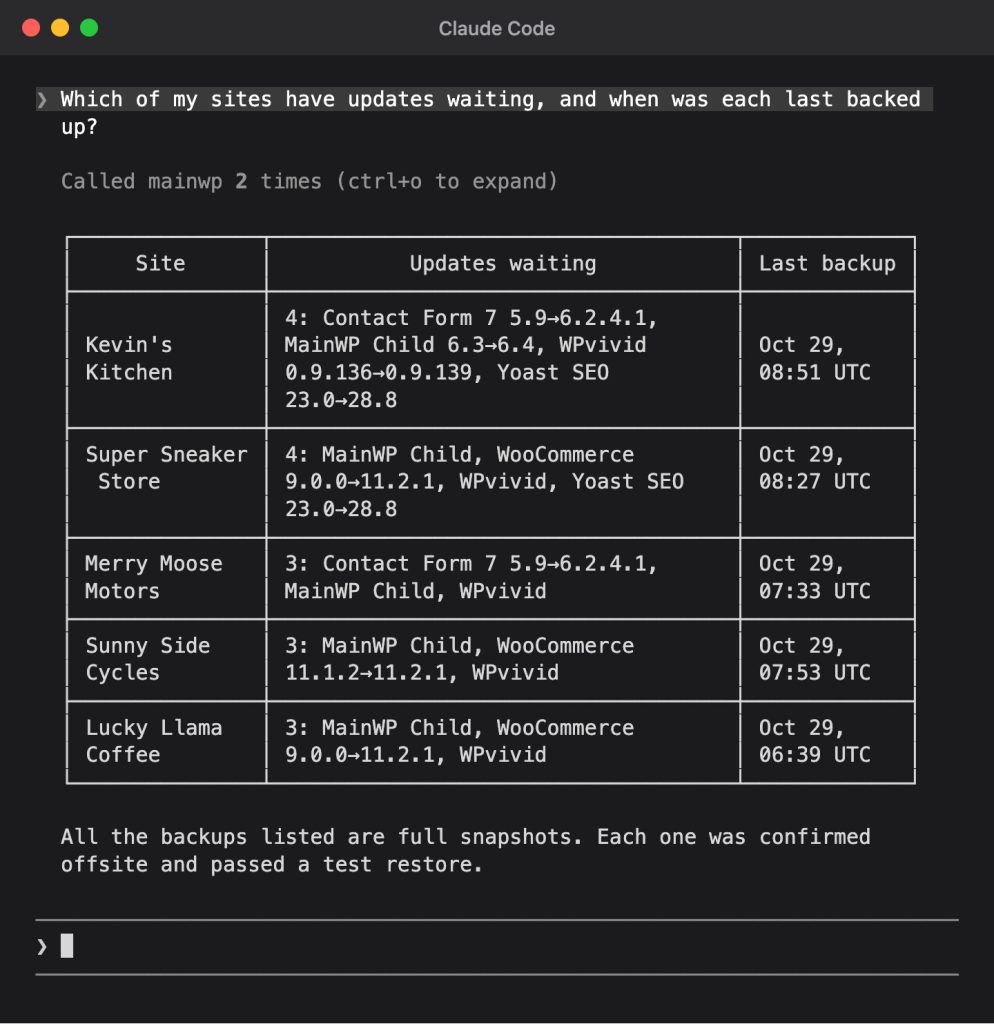
Claude Code lists the plugin updates waiting on each client site and when each site was last backed up, through the MainWP MCP server

Use AI on client sites without giving up control

Ask Claude, ChatGPT, or the built-in MainWP Assistant which client sites have updates pending. Apps connect straight to your MainWP Dashboard with no MainWP service in between. Save client rules in MainWP Knowledge, such as holding Friday updates, so assistants load them before planning.

Start read-only, preview updates and deletions before they run, and choose an approval policy for connected apps. MainWP Dashboard and MainWP MCP are free and open source.

See how MainWP AI works

Add-ons

Connect the tools you already use to your MainWP Dashboard

Over 60 add-ons bring your backup, security, monitoring, performance, and SEO tools into your Dashboard, including over 10 free add-ons and over 30 in MainWP Pro. Check results across all your sites without logging in to separate dashboards.

Dennis Dornon - MainWP Cofounder

MainWP is independent, founder-run, and built for site managers

MainWP has no corporate or hosting-company owner. Since 2014, our distributed team has built MainWP for WordPress professionals and agencies who want to own their tools and keep client data private and secure.

Client work rarely fits a rigid box. The free MainWP Dashboard and MainWP Child plugins are open source and built to extend, so you can shape workflows for a small roster or build custom solutions for a multi-person agency. Share ideas and vote on upcoming work on the MainWP Roadmap.

Privacy

Where does your client data live with MainWP?

On the server that hosts your MainWP Dashboard, in a WordPress database you run. See Privacy & Data Handling for optional services.

Donata Stroink-Skillrud

Donata Stroink-Skillrud, President of Agency Attorneys

Privacy laws apply to businesses that collect personal information. Since no personal information is collected by the MainWP plugins, no privacy laws apply to the MainWP plugins. This includes GDPR, UK DPA 2018, PIPEDA, Australia Privacy Act 1988, LGPD, PIPL, and other privacy laws.​
GDPR
UK DPA 2018
PIPEDA
LGPD
PIPL
and other privacy laws
Quick Start

Install and connect MainWP in three steps

Once WordPress is ready, install the free MainWP Dashboard and MainWP Child plugins and connect your first site in about three minutes.
MainWP Dashboard plugin card in the WordPress plugin installer, ready to activate
MainWP Child plugin card in the WordPress plugin installer, ready to activate
Add New Site form in the MainWP Dashboard with the site URL field and the MainWP Child confirmation toggle

What WordPress professionals and agencies say about MainWP

Over 2,200 five-star reviews on WordPress.org

"We have been using MainWP since 2014; we took a little break from it for less than a year testing out ManageWP but we were missing the flexibility, stability and control over our WordPress maintenance tool. So, in Sept 2019, we moved back over 75 sites back to MainWP and it was the best decision we ever make...."
Frederic Sune
"MainWP is the only tool I use EVERY day for my business. I tried a few other services before settling on MainWP almost 8 years ago, and it’s been an enormous time saver. The fact that it’s self-hosted is an important feature for me. I like to be in control of my data. Support is fantastic. Bogdan and the team are always a pleasure to deal with, and their knowledge is excellent – it’s been a no-brainer for me!"
Dave Cocking
"Thanks to MainWP I can manage my clients sites with ease and confidence. Thanks to the trusted updates, I can automate manual tasks and save a lot of time managing 50+ sites."
Silvan Hagen
"MainWP is great for managing multiple WordPress sites. It has helped us simplify software installations and updates, backups management, security, reporting and so much more. Big time saver!"
Laurence Anthony
"MainWP was the best thing I found 8 years ago when I started my company in WordPress support. It saves me so much time managing the updates of the websites of my clients. The MainWP team is also great! Quick support and open for requests of their user base. I hope we can keep working together for many years to come!"
Jos Klever
"MainWP has helped me scale my WordPress support services to include WordPress software maintenance, which has added a nice amount of additional income to my business. It works beautifully and better than the alternatives."
Steven Doig
"MainWP has become a valuable asset to our small web design business. Before purchasing any licenses, I contacted support for a few questions, and the response was immediate. The customer service is absolutely stellar, and the functionality of the plugin works seamlessly for multiple site management. If you have used other popular site managers in the past, I strongly encourage you to give this a try. I think you will be as pleased as we are and make the switch."
Ben Brown
Owner at Pink Lizard Web
"MainWP has been a great tool to help us manage our clients’ websites and deliver proper support. More than just a tool, MainWP is also a community of developers who share insights, tips, and resources related to the WordPress ecosystem."
Erwan Manchec
"I only became aware of MainWP a few years ago and could no longer imagine everyday life without it. Keeping an overview and acting quickly is among the most important things when managing online projects. The numerous other features round that off. Many thanks to the MainWP team!"
Stefano C. Picco

Moving from a per-site WordPress manager?

Bring your client sites over in batches by bulk-installing MainWP Child with the tool you already use. See how to switch to MainWP

MainWP FAQ

Is MainWP free?

Yes. MainWP Core (the MainWP Dashboard and MainWP Child plugins) is free for unlimited sites, along with over 10 free MainWP Essentials and third-party add-ons. MainWP Pro adds over 30 premium add-ons and priority ticket support for one monthly, yearly, or lifetime price. See the plans.

Does MainWP charge per site?

No. MainWP Core and MainWP Pro both cover unlimited sites with no MainWP per-site fees.

What hosting does my MainWP Dashboard need?

Your MainWP Dashboard runs on standard WordPress hosting with WordPress 6.2 or later and PHP 8.3 or later, while MainWP Child runs on WordPress 6.2 or later and PHP 7.4 or later. As general sizing guidance, shared hosting suits up to 30 sites, reseller hosting fits 31 to 100 sites, and a VPS is recommended for networks over 100. See system requirements.

What does MainWP Pro add?

MainWP Pro includes every premium MainWP add-on, such as Pro Reports for branded client reports, White Label for agency branding, and Team Control for technician roles, plus priority ticket support. Compare MainWP Core and MainWP Pro.

Does MainWP work with AI assistants?

Yes. MainWP gives you three ways to use AI with your MainWP Dashboard.

  • Hosted apps (Dashboard 6.5+): connect claude.ai, ChatGPT, and other AI apps over public HTTPS with no local install. Set it up under AI > MainWP MCP > Connect an app.
  • Local apps and private Dashboards: run the free, open-source MainWP MCP server on your computer with Claude Desktop, Claude Code, Cursor, VS Code Copilot, or OpenAI Codex. Set it up under AI > MainWP MCP > Local server.
  • Inside your Dashboard (6.5+): MainWP Assistant adds built-in chat with Docs mode (no AI key) and Sites mode (WordPress 7.0+).

Save your standards and client rules in MainWP Knowledge so assistants load them before planning. Start with read-only access, preview updates and deletions before they run, and choose an approval policy for connected apps. Read about MainWP AI.

What data leaves my MainWP Dashboard?

The free MainWP Dashboard and MainWP Child plugins send no telemetry to MainWP by default. Your Dashboard talks directly to your child sites. When you activate paid add-ons, MainWP checks your Dashboard domain and IP to verify your license, with no child site data collected. If you turn on optional AI features, Assistant Docs mode sends questions to the MainWP documentation service, while Sites mode sends requests to the AI provider you connect. External AI apps process requests under their own terms. Read Privacy & Data Handling.

Can I move my sites to MainWP from another tool?

Yes. Install MainWP Child on each site, then add sites individually or import them in batches from a CSV file. See how to switch to MainWP.

Close