

Cameron Dornon
Cameron Dornon is a marketer at MainWP, specializing in content that helps WordPress professionals streamline site management and improve their workflows.
AI can already answer questions about WordPress. Giving it access to manage your sites is the easy part.
The harder part is making sure it understands how your agency wants those sites managed.
Which updates should be avoided? Are there special instructions for a particular client? Does one site have a maintenance requirement that doesn’t apply anywhere else? And before an AI tool makes a change across several sites, can you see exactly what it intends to do?
Those are some of the problems we’re addressing in the MainWP 6.3 Early Access.
The centerpiece is a new feature called Knowledge, paired with major updates to the MainWP MCP Server and MainWP skills.
Together, they give connected AI tools more than just access to your MainWP Dashboard. They give them context about how you work.
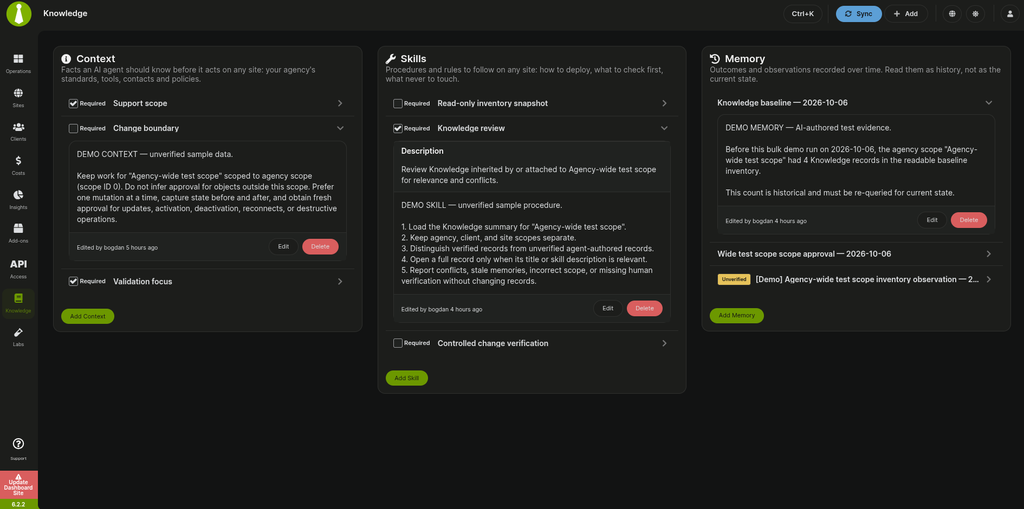
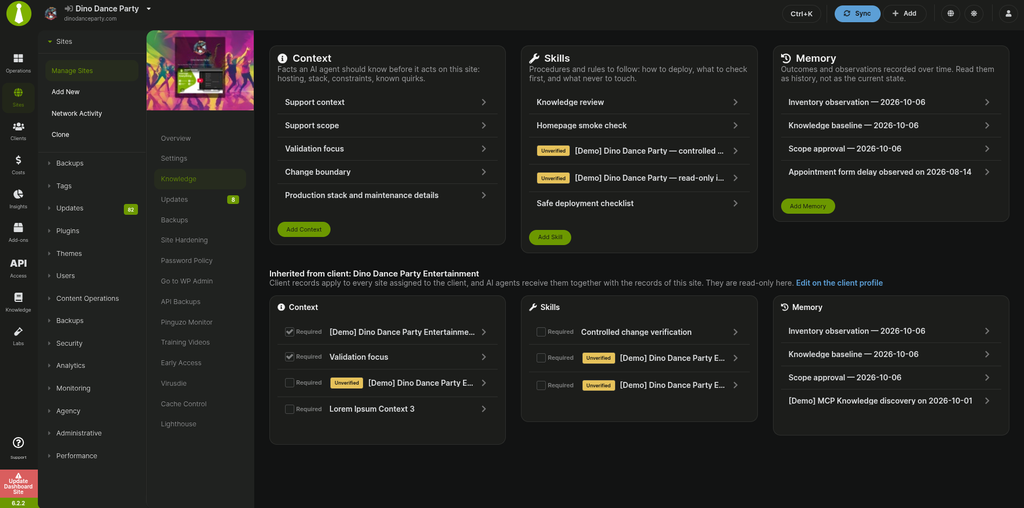
Knowledge gives you a central place in MainWP to store information and working instructions at the agency, client, and individual site levels.
That can include things like:
The important part is where this information lives.
Instead of keeping these details scattered across notes, documentation, prompts, or somebody’s memory, they can live alongside the sites they apply to in MainWP.
Connected MCP and AI tools can then use that Knowledge according to the permissions of the MainWP user they’re working through.
So an AI assistant isn’t starting from zero every time you ask it to investigate a problem or perform maintenance.
It can first understand the relevant agency, client, and site context.
Context is one half of the problem. The other is teaching an AI tool how MainWP should actually be used.
That’s where the MainWP MCP Server and our skills come in.
The skills provide AI agents with instructions for common MainWP workflows such as troubleshooting, maintenance, and updates. With MCP Server 1.4 and MainWP 6.3, those workflows can also pull in the appropriate Knowledge before planning what to do.
For example, instead of simply telling an AI:
Update these sites.
The workflow can consider:
That starts to move AI-assisted WordPress management from “here are some tools the AI can call” toward “here is how my agency wants those tools used.”
If you’re new to using MCP with MainWP, you can also see how to connect your AI assistant to MainWP.
We’re also tightening up what happens when an AI tool is ready to make changes.
With MainWP 6.3 and MCP Server 1.4, supported update actions can be previewed before they’re executed.
That means your AI tool can prepare an update plan and show you what it intends to change before asking for approval.
The preview can include the sites involved, version changes, major version jumps, and updates that were held back.
Only after you approve the plan does the update proceed.
Ignored updates and site-wide exclusions are also respected, rather than being installed simply because an AI requested an update.
The goal here isn’t to put an AI on autopilot.
It’s to let AI do more of the investigation and preparation while keeping you in control of the changes that actually reach your sites.
If multiple people or systems have access to your MainWP Dashboard, context and control need to follow the same permission model.
We’ve made a number of improvements to Team Control, the REST API, MainWP Abilities API, and API key permissions in 6.3.
Restricted users and API keys should only be able to access the sites and information assigned to them. That applies not only when someone is clicking around the Dashboard, but also when an external tool or AI agent is interacting with MainWP.
Client Overview has also been updated for restricted Team Control users, hiding management controls they aren’t allowed to use.
6.3 isn’t only about AI.
The Early Access includes a number of fixes and improvements throughout the Dashboard and Child plugin.
Some of the more noticeable ones include:
We’ve also made a number of under-the-hood changes around site deletion, REST behavior, authentication, input handling, and bundled libraries.
MainWP 6.3 is currently available through the MainWP Early Access program.
This Access is particularly useful to test if you’re interested in using MainWP with Claude, ChatGPT, coding agents, or other tools that support MCP.
Install the Early Access Extension and opt into the 6.3 Early Access to try Knowledge, the updated AI workflows, and the other changes before they reach the stable release.
For setup instructions, see How to use the Early Access Updater.
Early Access is meant for testing, so we recommend using them in an environment appropriate for pre-release software.
If you’re already using the MainWP MCP Server, we’re especially interested in your feedback on Knowledge, the updated MainWP skills, and the new preview-and-confirmation workflow.
They represent an important part of where we’re taking MainWP: AI that doesn’t just have access to your WordPress management tools, but understands the rules and context you want it to work within.

Manage Unlimited WordPress Sites from One Dashboard!


