

How to Remove WP Mail Logging Plugin Data on Your WordPress Website
Heads up: This page may include affiliate links. Read the full disclaimer.

The WP Mail Logging plugin is one of the most popular and easy-to-use plugins for logging emails sent from your WordPress website.
WP Mail Logging Plugin for WordPress

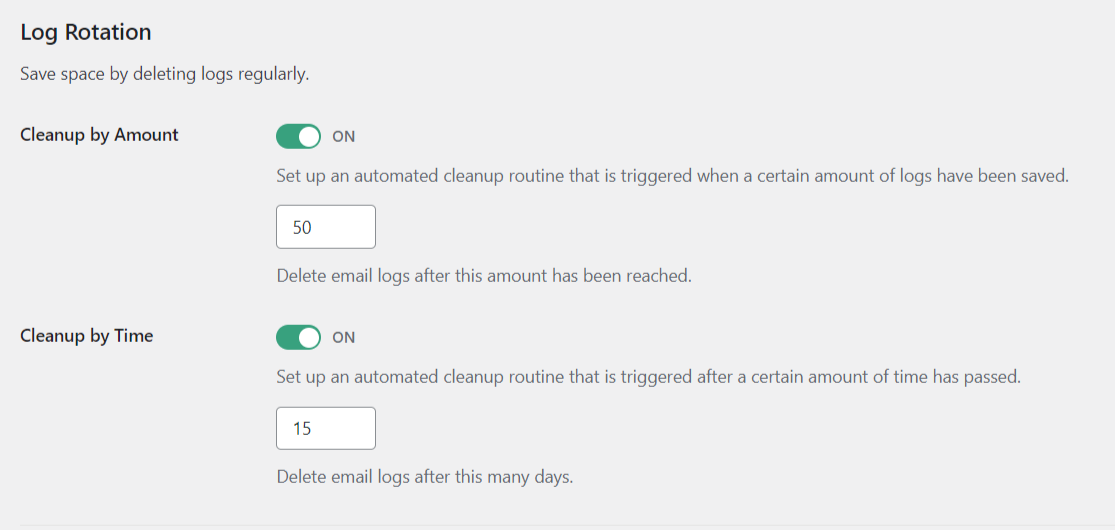
As keeping a log of emails sent can quickly increase the size of your database, it is recommended that you check and adjust the log retention settings according to your needs.
Navigate to Log Rention in the WP Mail Logging plugin.
If you want to change to an SMTP plugin that includes built-in email logging or use a different solution, you should make sure that the database table the plugin is using is deleted.
Recommended solutions to delete the WP Mail Logging plugin database table would be WP-Optimize or to use a host-provided application such as phpMyAdmin.
The WP Mail Logging plugin uses a single custom database table;
wp_wpml_mails
Plugin email logging database tables can take up significant storage space in a WordPress site’s database, mainly if the site generates a large volume of emails. Over time, this can result in database bloat, slowing down site performance and increasing the risk of database errors.
Deleting email logging database tables can help to remove this bloat and improve database performance. However, it’s vital to ensure that you are not deleting any important data required for your site’s functionality or compliance requirements.
In general, if you are confident that the email logging data is no longer required and won’t impact your site’s functionality or compliance requirements, deleting these tables can be an excellent way to optimize your database and improve site performance.
Did You Know? MainWP has a Maintenance Extension that allows you to clean databases of all your connected Child Sites directly from a centralized MainWP Dashboard.

Share


Manage Unlimited WordPress Sites from One Dashboard!
- Privacy-first, Open Source, Self-hosted
- Easy Client Management
- 15+ & 30 + Premium Add-ons
- Bulk Plugins & Themes Management