

How to Remove WPForms Plugin Data on Your WordPress Site
Heads up: This page may include affiliate links. Read the full disclaimer.

One of the most widely used form plugins is WPForms. The lite version of WPForms crossed over 5 million active installs.
The WPForms plugin uses the following custom database tables for data storage;
wp_wpforms_entries
wp_wpforms_entry_meta
wp_wpforms_entry_fields
wp_wpforms_tasks_meta
wp_wpforms_admin_builder_templates_cache_update
wp_wpforms_email_summaries_fetch_info_blocks
wp_wpforms_process_forms_locator_save
wp_wpforms_process_forms_locator_scan
wp_wpforms_admin_addons_cache_update
The database prefix will differ depending on the table prefix defined in your site’s wp-config.php file.
The WPForms plugin has an uninstall option which can be found in the settings menu in wp-admin;
WPForms > Settings > Misc
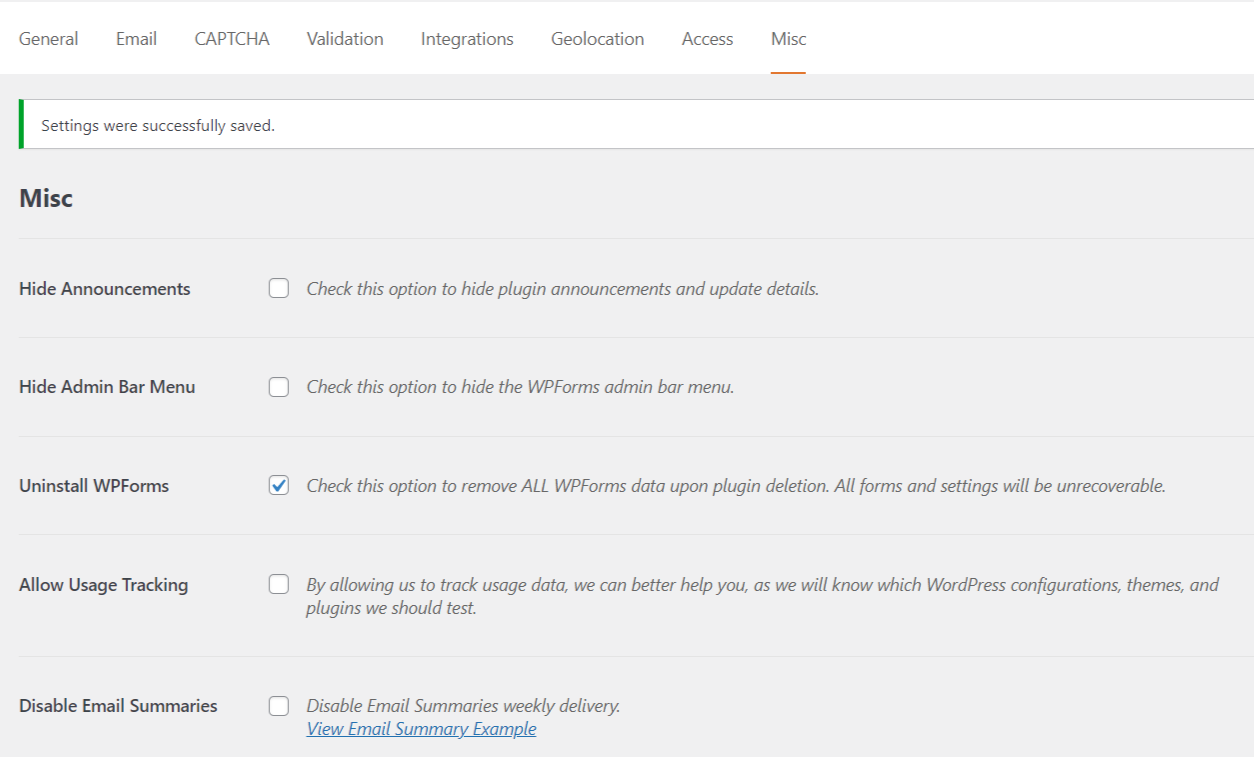
When you deactivate and delete the WPForms plugin, all the data it uses will be deleted without needing to manually delete database tables using phpMyAdmin or a plugin like WP-Optimize.
You can confirm that the WPForms database tables have been deleted by verifying using a host-provided application such as phpMyAdmin or a plugin such as SQL Buddy.
It is always recommended to clean up plugin data when switching to alternatives before you run into leftover data in your site’s database.
When you review existing data stored in the site’s database, it becomes harder to deal with database cleanup. It is also not recommended to be running multiple-form plugins.
Useful Links

Share


Manage Unlimited WordPress Sites from One Dashboard!
- Privacy-first, Open Source, Self-hosted
- Easy Client Management
- 15+ & 30 + Premium Add-ons
- Bulk Plugins & Themes Management