

Jetpack Plugin Database Cleanup on Sites Where the Plugin Has been Uninstalled
Heads up: This page may include affiliate links. Read the full disclaimer.

Jetpack is a well-used plugin on a number of sites and has over 5+ million active installs. But will all modules active it can cause extra requests on load as well as adding a number of extra external requests on load.

When you uninstall the Jetpack plugin it will not remove any of the 108 created options that will be left in your sites options database table.

You can search for the option_name which matches the following option name patterns;
_transient_jetpack%
_transient_timeout_jetpack_%
jetpack_%
Once you can then select the option names that match then select those options to be deleted. You could use phpMyAdmin to search for those option names.
Another option to use would be the Advanced Database Cleaner plugin. After you have installed and activated the plugin it will add a new menu item into wp-admin;
WP DB Cleaner > Options
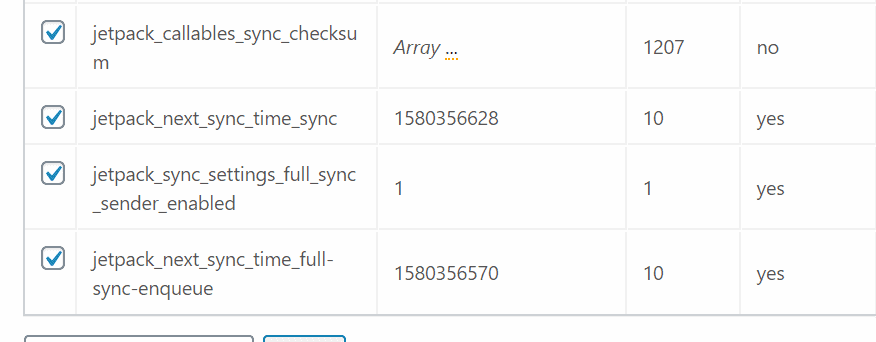
Find the Jetpack options and then you can delete them from the plugins screen.
MainWP has a very solid and easy to use an extension called Code Snippets which allows you to run code snippets on to any of your connected child sites. You can use this code snippet which deletes one option name pattern for Jetpack you can include the other option name patterns in an updated code snippet to verify that all Jetpack created options are deleted.
The MainWP community has a code snippets category this adds new code snippets weekly.
Being able to easily remove the Jetpack created options will remove some of the data bloat from your options database table. At least half of the Jetpack options are set to be autoloaded which is a performance issue with adding options that will be autoloaded.

Share


Manage Unlimited WordPress Sites from One Dashboard!
- Privacy-first, Open Source, Self-hosted
- Easy Client Management
- 15+ & 30 + Premium Add-ons
- Bulk Plugins & Themes Management