

How to Disable User Gravatar on Your Site
Heads up: This page may include affiliate links. Read the full disclaimer.

Gravatar is a hosted service from Automattic which allows you to create an avatar that is used on WordPress sites.
If you need to disable user Gravatar on a site for performance reasons you can do so using a couple of free plugins.
The first plugin is called Disable User Gravatar and once the plugin has been installed and activated you can disable Gravatar and use a locally uploaded image in the following settings;
Settings > Discussion

The Disable User Gravatar plugin will also work with a number of avatar plugins such as Avatar Manager.

The second plugin is called Clearfy that has a free version that will allow you to easily disable Gravar in the performance settings on a site after it has been installed and activated;
Settings > Clearfy > Performance
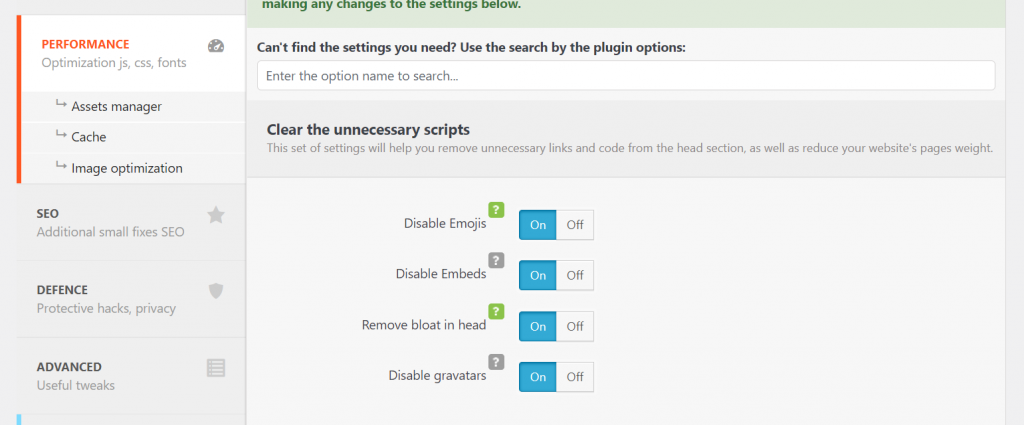
The Clearfy plugin also includes loads of site optimization options as well as there is a premium version that includes even more options.

Disabling users Gravatar is easy to achieve and the reason for doing so would be security and performance-related. When using native comments on your site if using Gravatar then you would notice an additional DNS request lookup for;
secure.gravatar.com
If you are looking for a very simple local avatar plugin then the recommendation would be to try the Simple Local Avatars plugin.

Share


Manage Unlimited WordPress Sites from One Dashboard!
- Privacy-first, Open Source, Self-hosted
- Easy Client Management
- 15+ & 30 + Premium Add-ons
- Bulk Plugins & Themes Management