

Meaning of Icons in the Status Column
Heads up: This page may include affiliate links. Read the full disclaimer.
On MainWP > Sites > Manage tab the Status column shows you the current status of your websites:
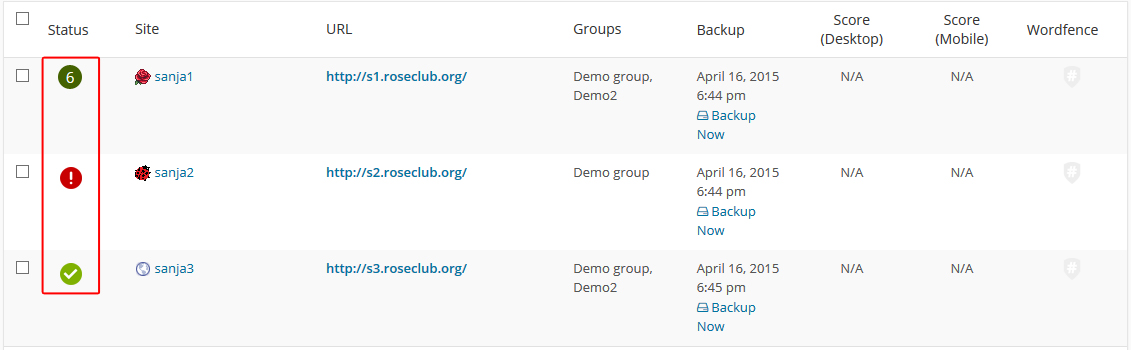
- The dark green icon with a number will show you the number of available updates on your site.
- The red exclamation mark indicates that the site is down.
- The green checkmark icon indicates that your site is online.
Also, your Status column can show you this icons:
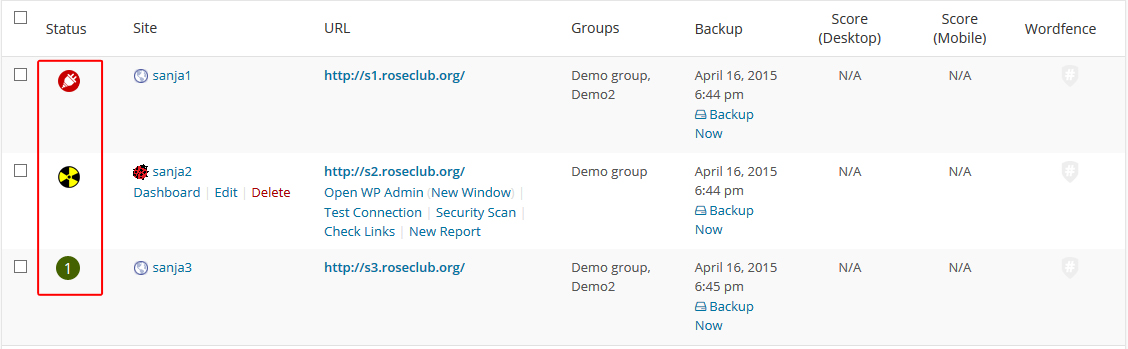
- The red plugin icons indicates that site is disconnected from dashboard.
- The yellow radiation icon indicates a plugin or theme conflict.

Share
Manage Unlimited WordPress Sites from One Dashboard!
- Privacy-first, Open Source, Self-hosted
- Easy Client Management
- 15+ & 30 + Premium Add-ons
- Bulk Plugins & Themes Management