

Notice: The Called Constructor Method For WP_Widget Is Deprecated Since Version 4.3.0! Use __construct()
Heads up: This page may include affiliate links. Read the full disclaimer.
We had an update recently to WordPress 4.3 that caused a few plugins to have some notices displayed on your websites and blogs. This is normal, over time old code and methods of doing things are deprecated, meaning they are “retired” from normal everyday use. The notice actually gave you a LOT of time to fix your code, as these are PHP4 style constructors.
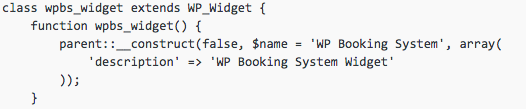
When you get a notice on your screen similar to the one above (which may also refer to WordPress files like pluggable.php), just go to your plugin editor (plugins, editor) and change the following:
$this->WP_Widget(
into something like this (in an upcoming post we’ll talk about why you use the double-colon scope resolution operator in a class)
parent::__construct(
Hit “Update File” at the bottom and if all goes according to plan, your problems are permanently taken care of. At least, until the next plugin update, in which the developer hopefully takes care of the issue also.

Share
Manage Unlimited WordPress Sites from One Dashboard!
- Privacy-first, Open Source, Self-hosted
- Easy Client Management
- 15+ & 30 + Premium Add-ons
- Bulk Plugins & Themes Management
3 comments
Dean
Works like a charm, thank you! I’m still using old plugin and now I found how to debug it.
梦浪
not find $this->WP_Widget( in all files (sorry ,my English is poor)
梦浪
what should I do ?
Comments are closed.