

How to Remove the Smush Plugin Data on Your WordPress
Heads up: This page may include affiliate links. Read the full disclaimer.

If you’re using the Smush image optimization plugin for WordPress but want to switch to another plugin, you can remove the previous Smush plugin data from your website’s database.
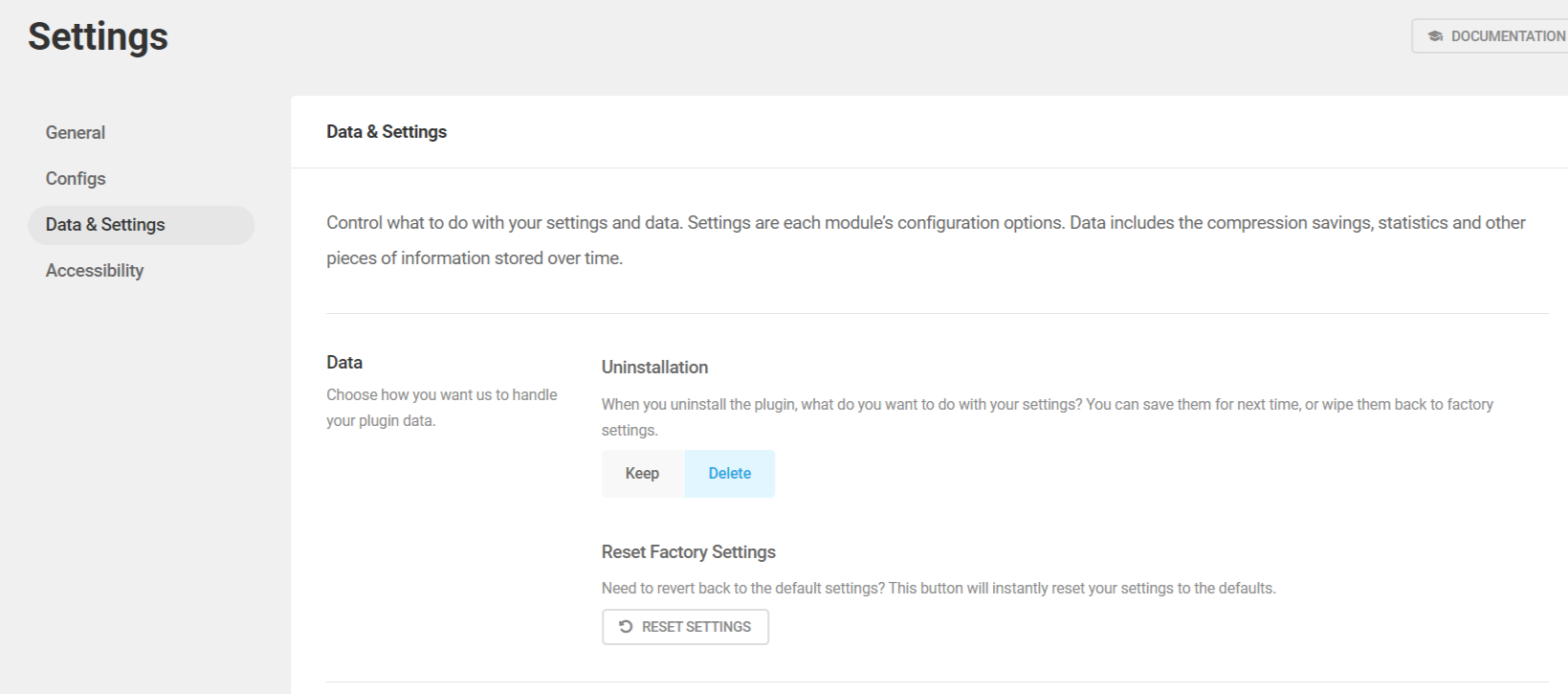
To ensure the deletion of Smush plugin data upon uninstallation, from your WordPress admin dashboard, navigate to:
Smush > Settings > Data & Settings
Here’s the custom database table that the Smush plugin uses;
wp_smush_dir_images
If you want to manually delete the Smush database table, you can use the WP-Optimize plugin to search for the Smush database table and remove it.
Furthermore, many hosting providers offer a user-friendly database management application, phpMyAdmin, from where you can locate the Smush database table and easily remove it from your website’s database.
To keep your site’s database clean and optimized, it’s important to delete any stored data when uninstalling a plugin.
If you don’t remove plugin-stored data properly when you’re no longer using a plugin, it can lead to orphaned options and custom database tables lingering in your site’s database.
Did You Know? MainWP has a Maintenance Extension that allows you to clean databases of all your connected Child Sites directly from a centralized MainWP Dashboard.
Useful Links

Share


Manage Unlimited WordPress Sites from One Dashboard!
- Privacy-first, Open Source, Self-hosted
- Easy Client Management
- 15+ & 30 + Premium Add-ons
- Bulk Plugins & Themes Management