
Show Child Site Icon
Published on April 7, 2015 by Bogdan Rapaić in MainWP Blog under
Heads up: This page may include affiliate links. Read the full disclaimer.
MainWP Dashboard plugin allows you to show child site icons (favicons):
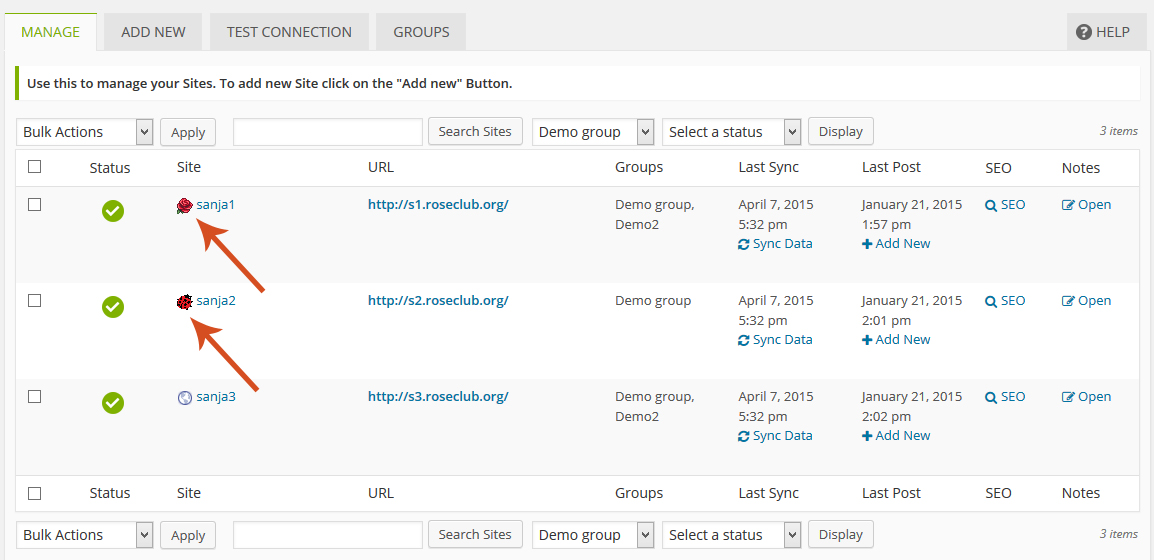
If the option is enabled, icons will show in Manage Sites table and Select Sites box.
By default, this option is enabled. To turn off that option, go to: MainWP > Dashboard > Settings > Global Option tab and locate Use Child Site Favicon option on Global Option options box and set on NO:
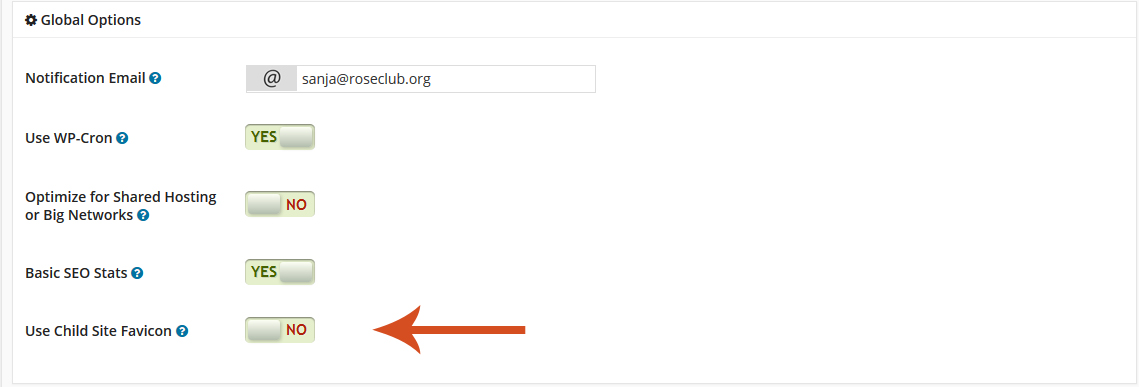
and click the Save Settings button at the bottom of page.

Share
Manage Unlimited WordPress Sites from One Dashboard!
- Privacy-first, Open Source, Self-hosted
- Easy Client Management
- 15+ & 30 + Premium Add-ons
- Bulk Plugins & Themes Management
2 comments
David
I have this set to On. I see; 2 Favicons, 8 WordPress Icons, and 27 missing image graphics.
If I open any site it’s favicon shows on the tab I opened it in.
Sophie
Hey David,
three years later and I have the same problem. A lot of favicons aren’t visible. I don’t know why.
Comments are closed.