


Todd Jones
Along with being the resident writer for MainWP and content hacker at Copyflight, I specialize in writing about startups, entrepreneurs, social media, WordPress and inbound marketing topics.

Often, when a product review is completed, it is difficult to know the relationship. They are simply affilliate marketing articles without the disclosure.
This is just one issue with reviews and affiliate marketing. A lack of disclosing relationships is disingenuous at best and dishonest at its worst.
We have a legal and ethical responsibility to disclose our affiliate relationships.
Disclaimer: Do not use this article as legal advice, it is not intended as such. Do your own research!
The FTC (Federal Trade Commission) has made it clear that a disclosure is something you should have on your website. While this applies to those who are in the United States of America, it also applies to any site who has visitors from the US as well.
The FTC guidelines apply to all websites promoting to US citizens – so if your site has US readers (it almost certainly does) you should comply. CodeinWP
Most people who get into affiliate marketing realize that they need to disclose their relationship. Most, also, attempt to go above and beyond to let people know they have this connection. They attempt to be completely transparent about who they represent.
If you need to view the entire guidelines from the FTC. Additionally, here is a detailed break-down from Rae Hoffman at Marketing Land.
The FTC disclosure guidelines: An in-depth exploration of what affiliates and merchants need to know
How can you word your disclaimer? The best practice is to have a full disclosure on a single page with shorter disclaimers near the actual links.
Rae Hoffman includes her more extended disclosure on her Privacy page.
With respect to Ad Servers: To try and bring you offers that are of interest to you, we have relationships with other companies that we allow to place ads on our Web pages. As a result of your visit to our site, ad server companies may collect information such as your domain type, your IP address and clickstream information. For further information, consult the privacy policies of:
- www.google.com/adsense
- www.google.com/analytics
- www.cj.com
- www.shareasale.com
- www.pepperjamnetwork.com
- www.clickbank.com
Veteran internet marketer Pat Flynn has an entire page dedicated to affiliate marketing disclosure. He starts the page like this,
Hi. Pat Flynn here. I’ve always believed in transparency on the web and so I am disclosing that I’ve included certain products and links to those products on this site that I will earn an affiliate commission for any purchases you make. My goal with the blog is to help educate you on the possibilities that exist for a blogger in practically any field, but please understand I am doing this as a for-profit business and, frankly, so should you with your site unless you have some charitable endeavor in mind.
Andrea Whitmer at Nuts and Bolts Marketing includes her disclosure with all of the other legal mumbo jumbo in one single disclosure page.
Need some help writing a disclosure? Here are a couple of resources:
Where to Get a Disclaimer for Your Website
How to Write a Blog Disclaimer
Where are some of the areas you add your disclaimer statement? There are three excellent places to add your disclaimer statement.
Before the post
I pointed to the statement on Nuts and Bolts Media in a former post. Andrea puts her disclaimer statement before the post, and it makes sense.
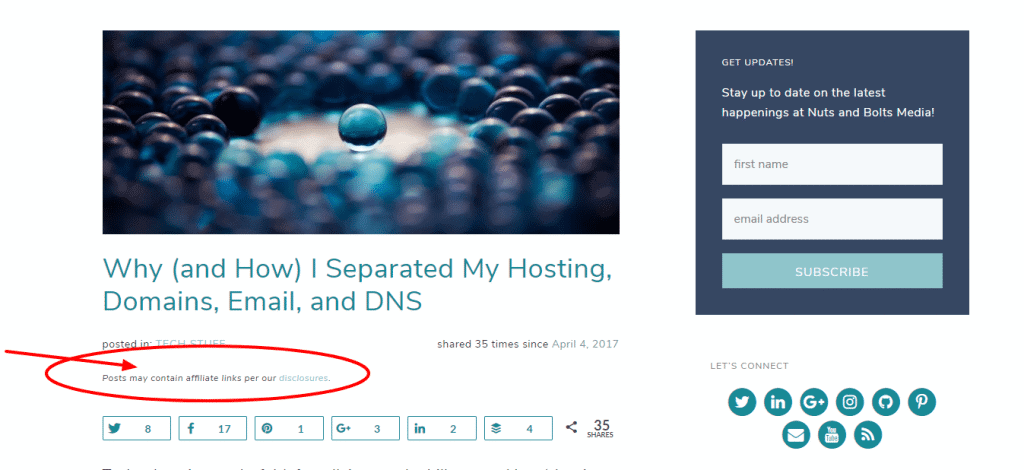
After the post
Another great place to add your disclaimer statement is after the post. This can is done with a shortcode, an after-post widget, or by making a customized plugin. The problem with a disclosure after a post is that the FTC wants it to be clear up front where people do not have to scroll to find the disclosure.
Preferably, design advertisements so that “scrolling” is not necessary in order to find a disclosure. When scrolling is necessary, use text or visual cues to encourage consumers to scroll to view the disclosure. FTC .com disclosures
Save the after post area for affiliate links, email sign up, or for a product to sell.
Bourne Creative does both the email sign up and a soft sell as you can see in this blog post.

Sell your services

In the Footer
The footer is another excellent place to add a disclaimer statement. It will be on every page and link to your disclosure page. There seems to be some lack of clarity here for affiliate disclaimers in the footer. For example, Amy Lynn Andrews, in her excellent overview of disclosures, says
It should not get separated from the “triggering item” by unrelated information or graphics. For example, a standard disclosure in your footer may not be sufficient if your footer is separated from your post. Or, if your disclosure is placed in another section of your site (say your sidebar), many times it will get separated by unrelated information when it’s being read on a mobile device.
If you are using the Amazon affiliate program, it may take more than a simple link to a disclosure page as evident from this summary from Sara Young.
My opinion (not advice) is to not rely solely on a statement in your footer. Here is an example from the blog of Amy Lynn Andrews on linking to an affiliate page in the footer.

What are the best ways to add your disclaimer statement in these places on your website? There are four methods you can use to help you display your affiliate marketing display statement.
Widgets
The use of a before and after post widget can help you add your display whenever you need to add the disclaimer. If you choose to use a widget, then you will need to add the disclaimer manually when you use an affiliate link in your post.
WPBeginner has a good tutorial on how to build your own custom widget.
Shortcode
Lovely Blog Academy breaks down how you can add a shortcode to display your disclosure in this guide.
Custom Code
Maybe you want to use custom code to add your disclosure in a “set it and forget it” manner. If you are using affiliate marketing links regularly, this might appeal to you. You can create that code to render either before or after the blog post or both.
Plugin
You may just want to find a good lightweight plugin to display your disclosure for you. Here are a few you may consider.
Signature Widget for Genesis – Read about the plugin here.
Add an Affiliate Disclosure Statement with Advanced Custom Fields
Just a cursory look at many WordPress bloggers and it seems many have not updated their disclosure methods. They seem to be satisfied with a hint in the footer, but the FTC updated their policies in 2013, and bloggers need to be aware.
The biggest issue I see is not disclosing above the link, or, before the link as required by the FTC. Therefore, a simple footer link and disclosure does not suffice.
As Hoffman says in her article at Marketing Land,
The disclosure must always appear before the first instance of affiliate link, above the fold, without needing to scroll or look past the affiliate link to see it. It should be as close as possible to the first place a user will look within the content when they arrive. The FTC has advised that disclosures should go as close to the beginning of the content as possible. Disclosures at the end of posts or the end of tweets or somewhere else that’s less than obvious do not meet the disclosure requirements.
We all are doing the best we can. I believe disclosing with greater transparency is the best policy. You may only use affiliates on specific pages, so a site-wide, above post disclosure, may be unnecessary.
Manage Unlimited WordPress Sites from One Dashboard!


