

Using Speed Booster Pack Plugin to Improve Your Child Site Performance
Heads up: This page may include affiliate links. Read the full disclaimer.

WordPress will try to load a number of additional requests, which in most cases are needed, such as emojis and dashicons. There is an easy to use a plugin called Speed Booster Pack, which can be installed on all connected child sites.
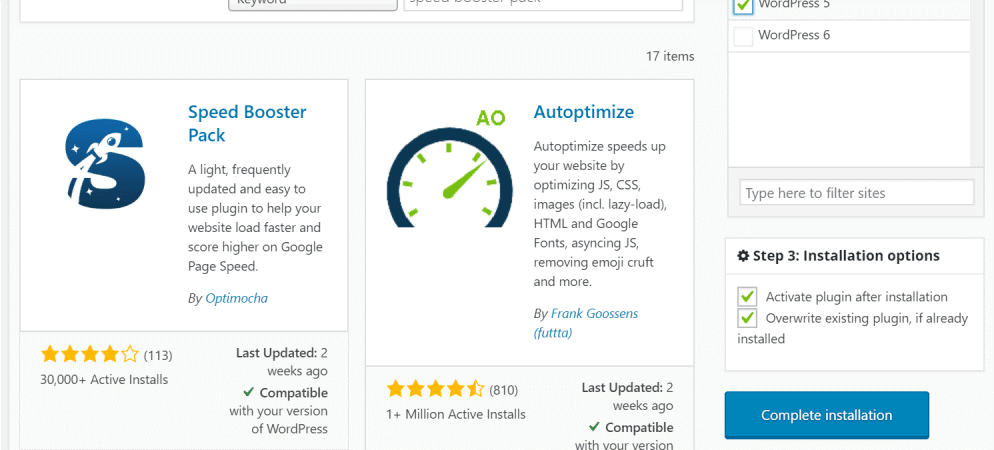
The settings can be enabled using the MainWP Bulk Settings Manager extension. You can use this key to save the settings in Speed Booster Pack to all child sites where it has been installed and activated.

If you have used WP Disable or Perfmatters plugins in the past, the Speed Booster Pack plugin is similar.
After you have installed and activated the plugin, it will add a new admin menu called:
Speed Booster Pack

The general settings tab has a number of assets which WordPress core will load. These can be disabled, along with setting the autosave time, and the regularity of the Heartbeat API frequency.
If you go to the advanced settings tab, a number of parts of HTML minification and CSS minification can be enabled. Remember to test these features. If the child site is running WooCommerce, then cart fragments can be disabled, which is a beta feature. This specific feature to disable cart fragments is also available in its own plugin if you did not want to use the Speed Booster Pack.
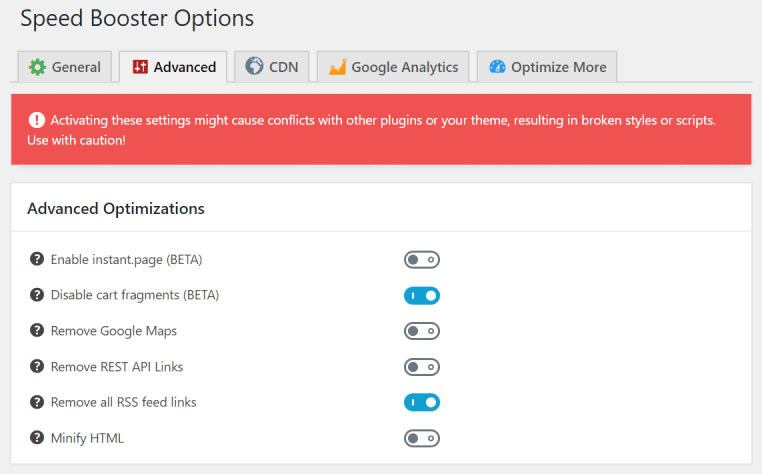
Other settings tabs in the Speed Booster Pack plugin cover include;
CDN

Google Analytics

The Speed Booster Pack plugin is easy to use on your child site and will help improve your site load times by making a number of optimization changes to your site.

Share


Manage Unlimited WordPress Sites from One Dashboard!
- Privacy-first, Open Source, Self-hosted
- Easy Client Management
- 15+ & 30 + Premium Add-ons
- Bulk Plugins & Themes Management
2 comments
Sebastian Moran
I would use Speed Booster Pack plugin with the Cache Enabler plugin.
sambaseck
Thanks.
Recommend to use it along with WP Rocket?
Comments are closed.