

How to Manage and Update Logging Retention in WooCommerce
Heads up: This page may include affiliate links. Read the full disclaimer.
WooCommerce has its own logging system, which was improved in the WooCommerce 8.6.0 release. WooCommerce logging is not the same as logging that WordPress generates when debugging is enabled on a site.
The default method used for log storage is the file system, where the log files are stored on the server in the following directory;
/uploads/wc-logs
WooCommerce logging supports logs stored in the site’s database, but this is not recommended for performance reasons on a production site. The default set for log retention in WooCommerce logging is for 30 days to reduce the number of log files being stored on the site’s server, and it is recommended that those be decreased to 15 days.
To be able to change the log retention, you can do so from the wp-admin of the site;
WooCommerce > Status > Logs > Settings
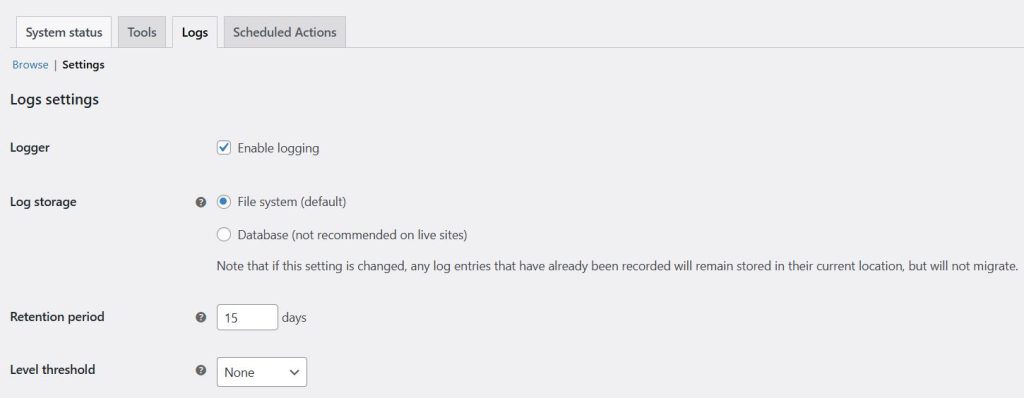
Changing the level of what is being logged is possible if you only want critical or emergency issues to be logged in the logging system. Then, you can change the logging level from the settings page for logs.

WooCommerce logging is very useful to have enabled on your site, but with a few minor changes, you can reduce how many logs are retained on the site server.
Useful Links

Share


Manage Unlimited WordPress Sites from One Dashboard!
- Privacy-first, Open Source, Self-hosted
- Easy Client Management
- 15+ & 30 + Premium Add-ons
- Bulk Plugins & Themes Management