

WordPress management: A day in a life – or an hour
Heads up: This page may include affiliate links. Read the full disclaimer.
People use WordPress management services to do many different things and in the process save themselves a lot of precious time. Work that can take a day, can be accomplished in an hour.
And while there certainly is a myriad of tasks that can be performed with these WordPress management services, some of them stand out because they make the very core of maintenance that every WordPress site requires. They are also unsurprisingly the most common and popular features, so let’s take a closer look at them.
Updates for plugins, themes and WP itself
Logging into WP site, updating, waiting and waiting some more, and then repeating those steps dozens of times OR one click from a dashboard? Hmm, let me think….
And this covers plugins, themes and WordPress installation itself. Oh, you want automatic updates, but not for all plugins and you want a report when it happens? You are completely covered.
Many WordPress management services include at least some level of this functionality, however MainWP offers all aforementioned for free. And from personal experience, it absolutely delivers.
Uptime monitoring
OK, everything is being updated the way you wanted but you have an itch. What if something goes wrong, what if website goes down? Hopefully nothing will go wrong, but if it does you can be notified instantly so you can attend the situation as soon as you can.
Almost all WordPress management services offer Uptime monitoring, but with some caveats or cost. MainWP offers it as a free extension with a limitation of 50 added websites which is imposed by the Uptime API.
Backups
Things went bad? Really bad? No problem because you have backups! Right? …R-right?
Well you can certainly have them in the future and they can be set up and managed from one spot.
Opting for automatic updates will be a no-brainer for most. After all, reducing the hassle and risk is a main appeal of these WordPress management services. Depending on the service, you will be able to save backups locally or remotely, and even have multiple backup options for when you need that extra bit of safety.
Prices for these additional options vary quite a lot. In MainWP’s case, only the remote backup option requires a paid extension. I’ve been using it for the longest time and it came through without a hitch every time.
Other niceties
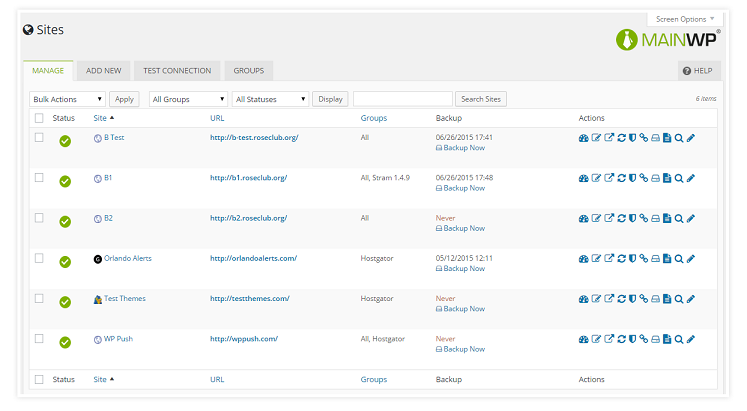
Having all of your managed sites in one place and being one click away from logging into any of them is what I call a tasty, tasty nicety. Forgotten login info will be a thing of the past.
Publishing pages and posts from a central place is another big time-saver. Using the familiar WordPress editor publishing is a breeze, and some WordPress management services also feature bulk posting for additional pleasure points. Also commonly included is comment management. Keep an eye on all activity, nuke the spam, moderate comments – all at one place.
MainWP features all mentioned niceties for free excluding comment management which requires a paid extension.
Personal experiences with WordPress management services
When you use WordPress management services, you just know you’re doing the smart thing. Why do something many times if it can be done once, why fret whether you backed up a website when it can be done automatically. You get the picture. And staring at the Dashboard, with all the control and status overviews it features, you start feeling like a captain of a spaceship. But without the overwhelming responsibility, hair-loss and spandex suits.
I’ve tried some paid solutions in the past, and while they worked fine for the most part, they ended up eating a big chunk of what I was earning from these websites. And frankly, that was a very bitter pill to swallow.
MainWP’s way of providing important stuff for free and offering advanced functionality for purchase via addons, instead of tiers which bundle bunch of stuff you might not need, fits me perfectly. Maybe it will fit you too – take a look here: MainWP extensions (ordered by popularity).

Share
Manage Unlimited WordPress Sites from One Dashboard!
- Privacy-first, Open Source, Self-hosted
- Easy Client Management
- 15+ & 30 + Premium Add-ons
- Bulk Plugins & Themes Management